
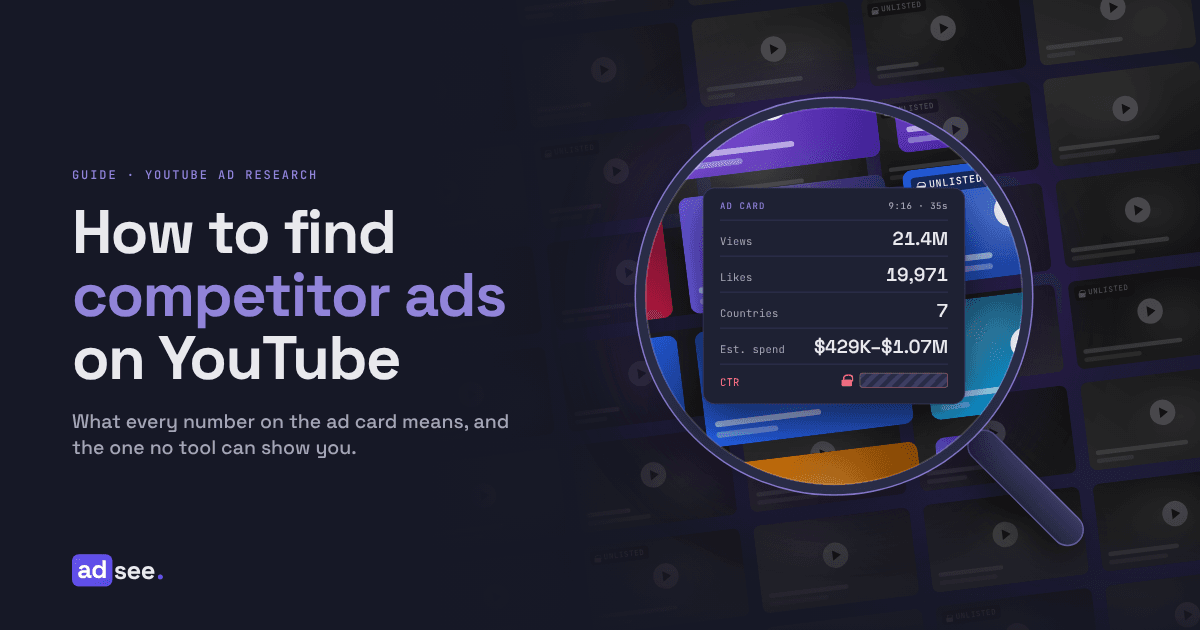
The fastest way to find competitor ads on YouTube is to search inside the ads, not on the competitor's channel, because many YouTube ads are unlisted uploads that never appear on a channel page. The AdSee AI YouTube ad library indexes 16M+ video ads, 5M+ of them unlisted, and adds 150K+ new ads every day, per AdSee AI.
This guide walks through every feature, from the first search to the ad card, the AI Assistant and the MCP connector for Claude and ChatGPT. It also covers the part most guides skip: which numbers you can read from a competitor's ad, and which ones nobody outside the advertiser's Google Ads account can see, such as CTR.
We use one niche as the running example: project management software. It starts with a good puzzle. Todoist ran the same 35-second script in two formats: the vertical version has 21.4M views and 19,971 likes, and the horizontal version has 5.6M views and 9 likes, per AdSee AI, with counters read on October 16, 2026. Same words, same speaker, same product. By the end of this guide, you will know how to read that gap, and the ad card itself gives you the answer.
Why most competitor ads on YouTube never appear on the brand's channel
Most competitor ads on YouTube are hard to find because many of them are unlisted: 5M+ of the 16M+ ads in the AdSee AI library are unlisted uploads, roughly one ad in three, and YouTube Help states that unlisted videos don't appear in a channel's Videos tab or in YouTube search results.
Three more things hide ads from a simple channel check. First, brands often run ads through agencies or regional accounts, so one company can advertise from several channels. Second, advertisers remove ads when a campaign ends, and the best ones often disappear first, because nobody wants a winner copied. Third, a channel page shows uploads, not delivery. It doesn't tell you which videos were bought as ads, in which countries, or how much money went behind them.
So a real search for competitor ads needs a source that records ads as they are served, keeps them after they are removed, and lets you search by what the ads say and show.
Three free ways to find competitor YouTube ads, and where each one stops
Google offers two free ways to find competitor YouTube ads, the Ads Transparency Center and the ad menu that opens My Ad Center, according to Google's March 2023 launch post, and the competitor's own channel is a third. All three can show that an ad exists, but none of them shows views, spend or the words inside the ad.
Google Ads Transparency Center
The Google Ads Transparency Center is a free, searchable hub of ads from verified advertisers that Google launched in March 2023. Alejandro Borgia, Google's director of product management for ads safety, wrote in the launch post that it lets people look up an advertiser, see which ads ran in a region, and check the last date an ad ran and its format. A platform filter lets you limit results to YouTube.
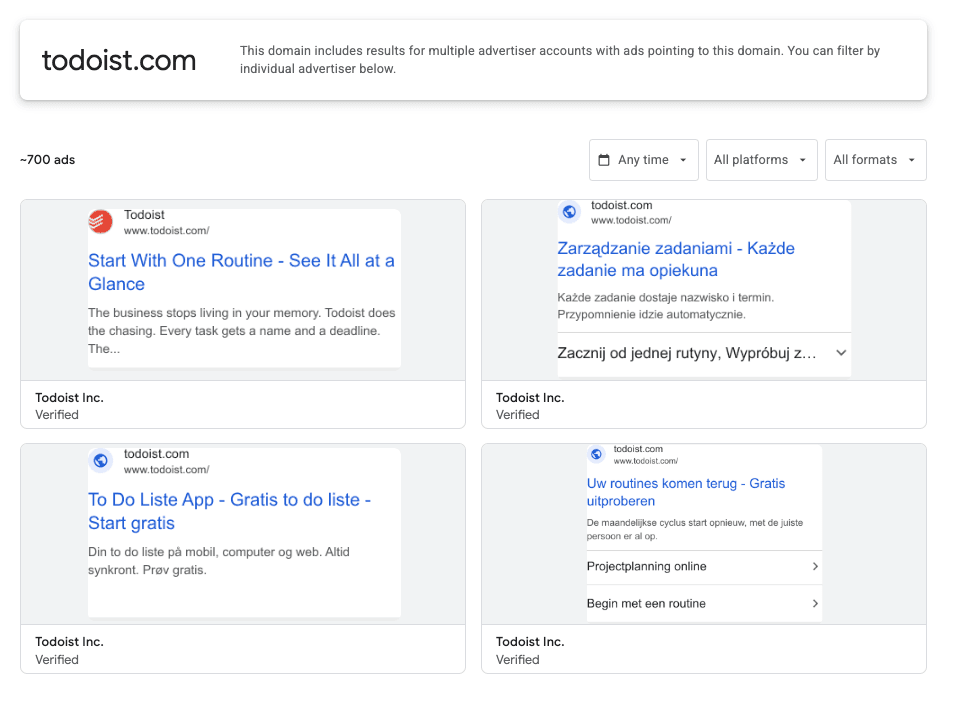
Dan Taylor, Google's vice president of global ads, said at the launch that "transparency breeds trust with people and with our partners," as Bloomberg reported. The tool was built for that kind of trust: it helps a viewer check who is behind an ad before buying. It was not built for competitor research.
Here is what it doesn't do. It is organised by verified advertiser account, so a brand that advertises through several agencies or regional accounts shows up in pieces. It shows no view counts and no spend for commercial ads. And you can't search for a phrase spoken in an ad or a scene shown on screen. Ads served in the European Union carry more detail, because the EU's Digital Services Act requires very large platforms to keep public ad repositories. Outside the EU, the detail page is much thinner.
The ad menu on ads you see
The three-dot menu next to an ad on YouTube opens My Ad Center, which shows who the advertiser is and links to their other ads in the Transparency Center, according to the same Google launch post. It is quick, but it only works for ads YouTube chooses to show you. Your own targeting profile decides what you see, so a competitor's ads for another country, age group or audience never reach you.
The competitor's channel and YouTube search
A brand's channel and YouTube search show public uploads only. That covers brand films, tutorials and some ads, but not the unlisted cuts made only for paid placement. You also get no signal about which videos were promoted.
| Free method | What you get | What you miss |
|---|---|---|
| Google Ads Transparency Center | Ads by verified advertiser, format, region, last shown date | Views, spend, search inside the ad, ads run from other accounts |
| Ad menu (My Ad Center) | Advertiser name and a link to their ads | Every ad that isn't targeted at you |
| Channel and YouTube search | Public uploads | Unlisted ads and any sign of paid delivery |
How the AdSee AI YouTube ad library finds the ads free tools miss
The AdSee AI YouTube ad library collects video ads as they are served on YouTube, including unlisted uploads, and keeps a copy of each ad even after the advertiser removes it, per AdSee AI. That changes the starting point of research: you start from the creative, not from an advertiser account.
Every ad in the AI-analyzed index is transcribed and described by AI. The spoken words, the text on screen and a description of each scene all become searchable. AdSee AI then groups ads by brand and by domain, whichever account or agency ran them, and adds view counts, likes, countries, an estimated spend range and the landing page.
The library covers ads recorded from 2025 onward and grows by 150K+ ads a day, so a competitor's new creative usually appears within a day, per AdSee AI. One detail to remember: the publish date on a card is the date the video was uploaded to YouTube. In our project management search, Nulab's Backlog ad carries a 2018 upload date. Uploads and campaigns run on different clocks.
Six ways to search competitor YouTube ads in AdSee AI
AdSee AI gives you six ways into its library of 16M+ ads, per AdSee AI: brand or domain, spoken words, on-screen text, visual scenes, similar ads, and plain-language questions to the AI Assistant. Each one answers a different research question, and the best searches combine two or three of them.
Brand and domain search
Brand search finds a competitor's ads by the advertiser name, and domain search finds them by the website the ads send traffic to. A brand search for Todoist returned 24 Todoist ads with 51.1M views in total, per AdSee AI.
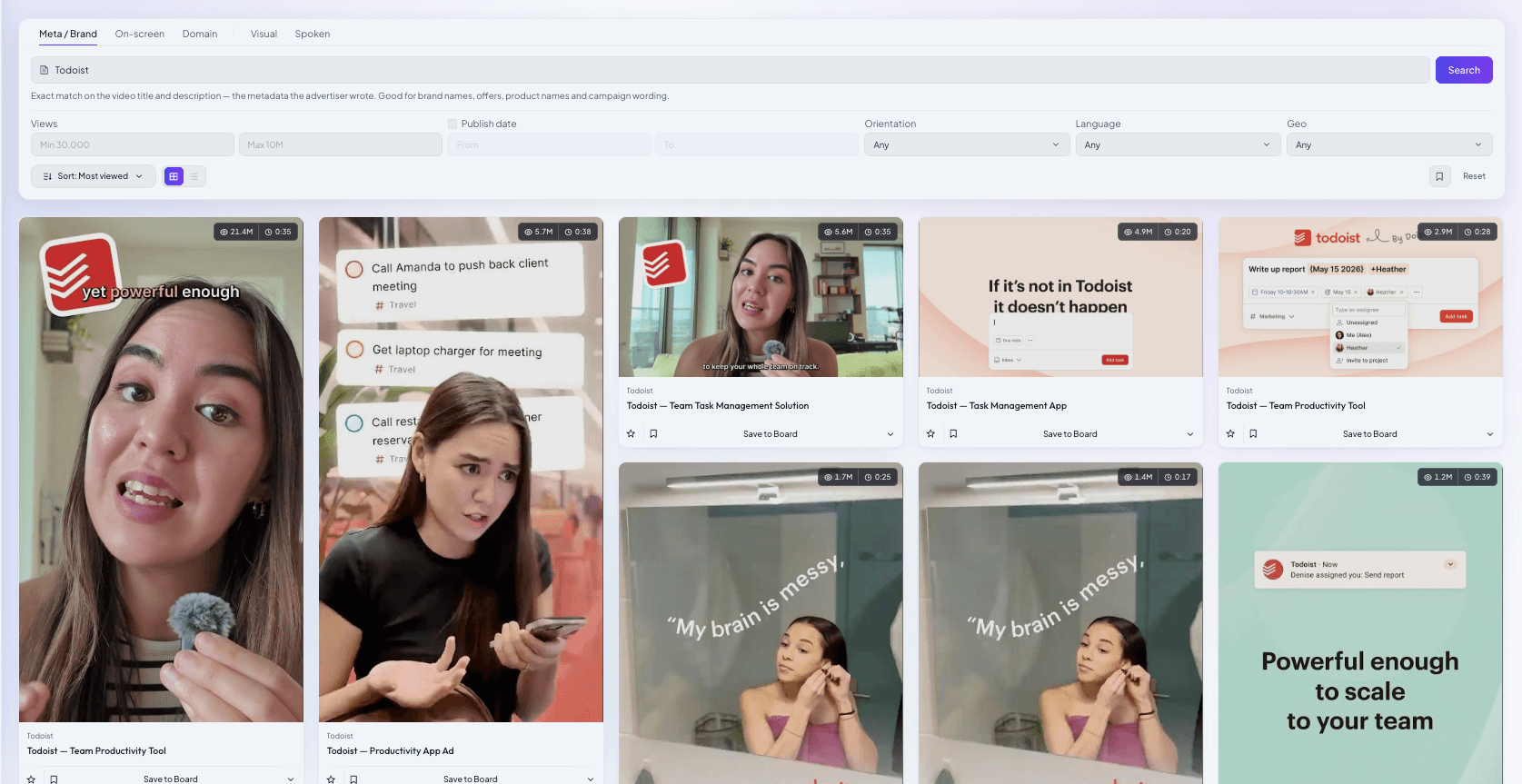
Brand search is not a closed list. The same Todoist search also returned ads from other advertisers, for example a podcast that promoted an episode about how Todoist is built. Check the brand and domain fields before you add an ad to your research. Domain search helps when a competitor runs ads through partners or resellers whose channel names you don't know.
Spoken-word search
Spoken-word search matches the meaning of what is said in the voiceover or dialogue, not exact keywords. We searched for "project management software for teams, organize tasks and projects" and got ads from Skello, Bitrix24, Zoho, monday.com, Todoist and Asana in French, Portuguese, German, Dutch, Polish, Swedish and English, per AdSee AI. Because the search is semantic, an English query finds ads in other languages.
Use it to research offers and pain points. Type the problem your product solves in your customer's words, or a claim like "free forever" or "cancel anytime", and see which competitors say it out loud.
On-screen text search
On-screen text search finds the exact words that appear on screen: a price, a promo code, a discount, a slogan. AI reads the frames, so the text doesn't need to be in the title or description. This is the fastest way to map which competitors push "50% off" and which ones push a free trial.
Visual search
Visual search finds ads by what happens on screen. Describe a scene in plain words, such as "woman talking to camera holding a small microphone" or "screen recording of a task board", and AdSee AI returns ads with that kind of footage. It is the best mode for researching formats: talking head, product demo, UGC review, before and after.
Similar ads
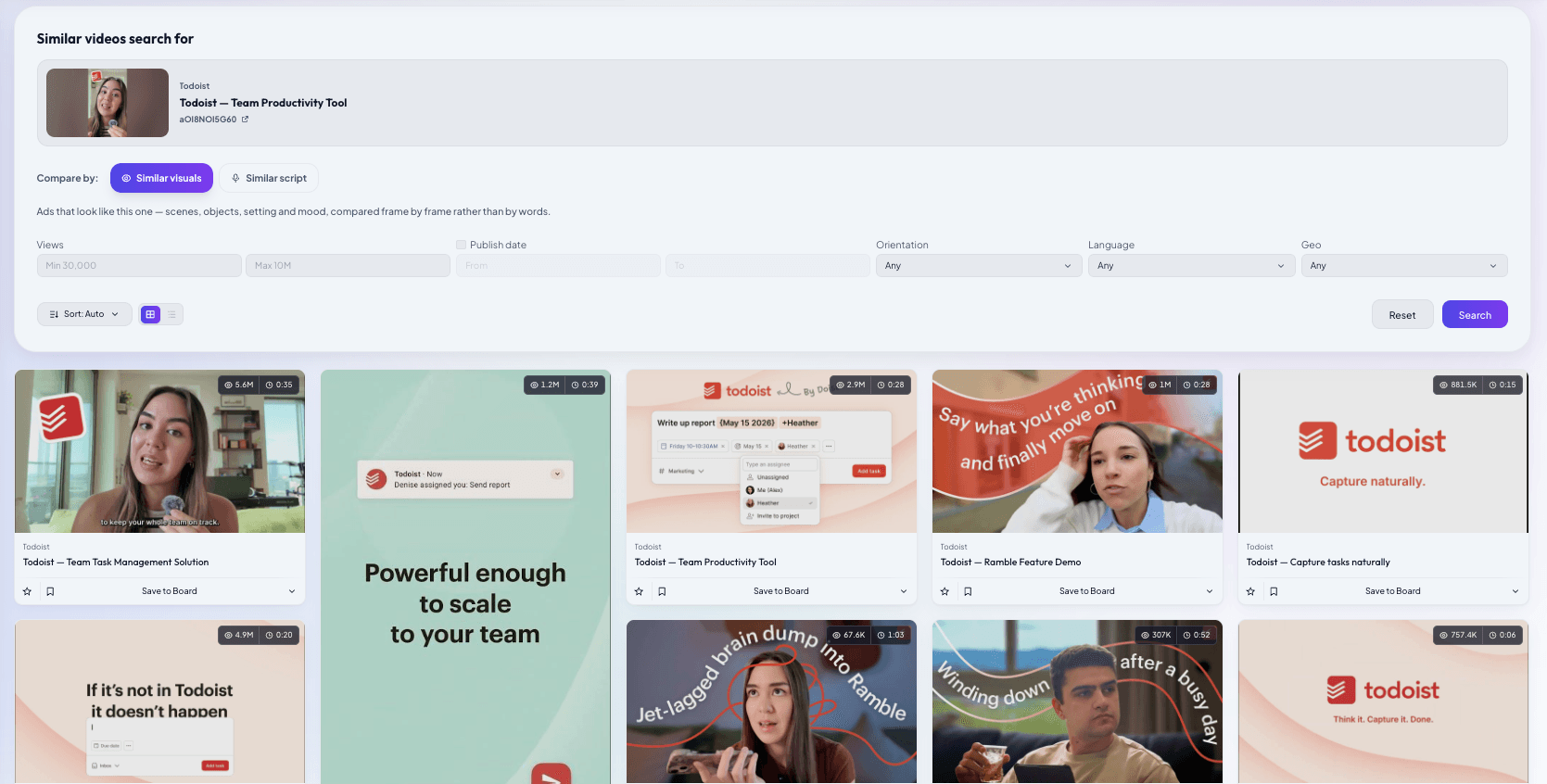
Similar-ad search takes one ad and finds others like it, matched on what is said, what is shown, or both. When we ran it on Todoist's top ad, the first 12 matches were all other Todoist ads, per AdSee AI. That makes it a quick way to map one competitor's full set of cuts and versions. To find look-alikes from other brands, describe the same idea in a visual or spoken search instead.
The AI relevance filter
Every search result in the app is checked by AI against your query, so off-topic matches are hidden before you see them, per AdSee AI. Keyword search is unlimited on every plan. AI-heavy actions, such as scene and voice search, similar-ad matching and reports, use monthly AI tokens.
Filters and sorting that turn a YouTube ad library search into a shortlist
AdSee AI narrows any search with five filters, per AdSee AI: a view-count range with a minimum and a maximum, a publish-date range, vertical or horizontal orientation, language and location. Results are sorted automatically by default, and you can re-sort them by date, newest or oldest first, or by views, from most to fewest or the other way round.
There is no industry filter. The query itself defines the niche: a category phrase in spoken-word search, a scene in visual search or a competitor's domain. AdSee AI also publishes hand-picked collections of top ads for 12 industries, from DTC to SaaS to healthcare, which anyone can browse without signing up. They are a quick way to see what a vertical looks like before you run your own search.

Three filter combinations do most of the work:
- A competitor in your market: the competitor's domain or brand name, plus your location.
- What is scaling now in a niche: a category phrase in spoken-word or on-screen text search, a publish date within the last 60 days, sorted by most views.
- Format research: a scene in visual search, plus orientation, plus the language of your market.
Two things you can't do: sort by spend, or sort by how long an ad has been running. You read those signals inside each card, as described below.
The view range cuts noise at both ends. In the ads we analyse at AdSee AI, ads below about 5,000 views carry too little signal to judge, so set that as the minimum. The maximum works the other way: cap views at, for example, 100,000 to find a competitor's recent tests before they get scaled.
How to use AdSee AI as a YouTube Shorts ads spy tool
To use AdSee AI as a YouTube Shorts ads spy tool, filter by portrait orientation: in our project management sample, every vertical ad collected one like per 681 to 1,075 views, per AdSee AI, which is the engagement level of content, not of an interruption. Vertical ads are the creatives built for Shorts and other vertical placements.
Two facts about Shorts change how you read the numbers. First, Google Ads Help says a Shorts ad adds a public view the moment playback starts. So a Shorts view count measures starts, not attention. Second, the same help page notes that Shorts viewers like, share and comment on ads through the same right-hand panel they use for organic Shorts, so a like costs them one tap.
The practical rule: compare vertical ads with vertical ads. A hypothetical vertical ad with one like per 1,000 views and a horizontal ad with one like per 500,000 views are not a good ad and a bad ad. They usually ran in different placements.
What's on an AdSee AI ad card, field by field
An AdSee AI ad card puts about 15 data points about one ad on a single page: views, likes, countries, estimated spend with a confidence level, publish date, length, orientation, language, industry, landing page, the original and descriptive titles, the ad copy, the hook, the transcript, on-screen text and a visual description, per AdSee AI. Here is what the key fields mean, using Todoist's top ad as the example.
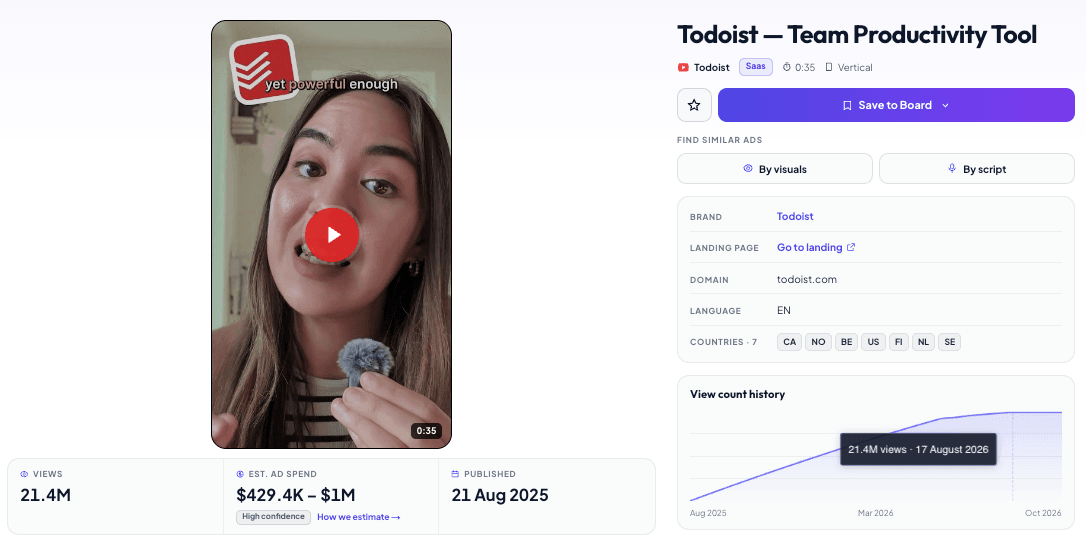
| Field | Todoist, "From Chaos to Clarity - Short" |
|---|---|
| Views | 21.4M |
| Likes | 19,971 |
| Countries | Canada, Norway, Belgium, US, Finland, Netherlands, Sweden |
| Estimated spend | $429.4K–$1.07M, high confidence |
| Published | August 21, 2025 |
| Length and orientation | 35 seconds, vertical |
| Landing page | todoist.com/teamwork, with UTM tags |
| Hook | A question about scattered messages and vague tasks |
Views: YouTube's public counter, not a measure of attention
The view count on an AdSee AI card is YouTube's public view count, which Google defines as organic views plus ad views, and Google Ads Help says an ad now adds a public view the moment it starts to play, across Shorts, skippable, non-skippable and bumper ads. So a view on the card is a started play, not a watched ad.
This is different from the TrueView view that advertisers pay for. For a skippable in-stream ad, Google counts a TrueView view only when someone watches 30 seconds, or the whole ad if it is shorter, or clicks. That number stays in the advertiser's account. The public counter is the only view number anyone else can see.
Three practical rules follow. Views measure reach, not interest. Views include organic plays, so a video that is popular on its own and also promoted looks bigger than its paid delivery. And counters move: YouTube may slow down, freeze or adjust a public count while it filters low-quality plays, so always note the date you read a number. Every counter in this guide was read on October 16, 2026.
Likes: the one public reaction left
Likes are the only public reaction left on a YouTube ad, because YouTube made dislike counts private in November 2021 and kept them visible only to creators in YouTube Studio, according to YouTube's announcement. That makes the like-to-view ratio the best free signal of whether people chose to watch.
To get it, divide views by likes. In AdSee AI data, ads that people choose to watch usually get one like per 80 to 400 views, and forced in-stream reach often sits near one like per 100,000 views or more, as we explained in our guide to the best YouTube ad examples in your niche. Todoist's vertical ad gets one like per 1,075 views. Its horizontal twin gets one like per 630,095 views, per AdSee AI. Some advertisers hide like counts, so a missing number doesn't mean zero.
Countries: where AdSee AI saw the ad served
The country list shows the markets where AdSee AI recorded the ad being served. It is evidence of delivery, not the advertiser's full targeting plan. Todoist's top ad lists seven countries: Canada, Norway, Belgium, the US, Finland, the Netherlands and Sweden.
The list can grow, and it can arrive late. monday.com's AI project-planning ad showed three countries in our search results and five on its full card on the same day. Todoist's creator-made airport ad showed no countries in search results and Germany, Switzerland and Austria on its card. AdSee AI notes that country data for unlisted ads can appear with a delay.
Read the list as a lifecycle signal. One or two cheap markets far from the brand's home usually mean a test. A regional cluster means a rollout. Dozens of markets mean a proven creative. Most of Todoist's ads from January to March 2026 ran in the same 14 to 16 markets across North America and Europe, one of them reached 30 countries, and its April and May 2026 ads list only the US and Canada, per AdSee AI. That is a pattern worth checking again in a month: either the brand narrowed to its core markets, or the country data is still arriving. Country placement data is part of the Pro plan.
Estimated spend and its confidence level
AdSee AI estimates spend by multiplying an ad's views by the lowest and highest cost-per-view benchmarks among the countries it ran in, so every estimate is a range. Todoist's 21,473,040 views multiplied by $0.02 and $0.05 per view give $429.4K to $1.07M, as described on the AdSee AI methodology page. Each card also shows a confidence level. Todoist's top ad is marked high confidence. The creator-made airport ad, estimated at $114.2K–$285.5K by AdSee AI, is marked low confidence.
Use the range to compare scale, for example a hypothetical $40K test against a $1M flight, not to guess an invoice. The estimate assumes paid delivery, so for a video with a lot of organic viewing it is an upper bound. One creative is also only one slice of a campaign: Todoist's 24 ads in AdSee AI add up to 51.1M views, and the top ad alone is 42% of them.
Publish date and view growth
The publish date is the day the video was uploaded to YouTube, not the day the campaign started, and the view growth chart on the card shows when the views actually arrived. Steady growth means someone is still paying for delivery. A spike followed by a flat line usually means a short flight that ended. Steps mean the advertiser keeps coming back to the creative. Spend trends and the ad lifecycle view are part of the Pro plan.
Landing page and UTM tags
The landing page shows where the ad sends traffic, and its UTM tags often show how the advertiser labels the campaign. UTM parameters are tags such as utm_source, utm_medium and utm_campaign that marketers add to a link to track where visits come from. Todoist's vertical ad links to its teamwork page with utm_campaign=short. Its horizontal twin uses utm_campaign=skippablead, per AdSee AI. The advertiser's own labels tell you that one version was made for Shorts and the other for skippable in-stream ads.
Landing pages also show the offer path. monday.com's AI project-planning ad sends viewers to a dedicated page about AI project management, not to the homepage. Study the page as carefully as the video. The ad makes a promise, and the page has to keep it.
AI creative fields: hook, transcript, on-screen text, visual description
AdSee AI extracts the hook, the full transcript, the on-screen text and a scene-by-scene visual description from each ad in the AI-analyzed index, so you can read an ad's structure before you watch it. Todoist's top ad opens with a question to the viewer: is your team juggling scattered messages and vague tasks? The creator-made airport ad opens with a stressed traveller searching her bag. One sells a team problem. The other sells a personal moment.
Google's ABCD playbook for YouTube creative advises: "Introduce your product or brand in the first five seconds." The hook field lets you check how a whole niche handles that advice in a few minutes. Each card also shows the advertiser's original YouTube title next to a descriptive title written by AdSee AI. "From Chaos to Clarity - Short" becomes "Todoist — Team Productivity Tool", which is easier to scan in a long list.
What you can't see about a competitor's YouTube ad: CTR, conversions and targeting
No outside tool can show a competitor's CTR, conversions, return on ad spend, real cost per view or targeting, because Google reports these metrics only inside the advertiser's own Google Ads account, and the table below maps 10 of these private metrics to the closest public signal. AdSee AI, the Transparency Center and every other research tool work with public signals. The useful skill is knowing which public signal stands in for each private metric.
| Private metric | Who can see it | Closest public signal in AdSee AI |
|---|---|---|
| Impressions | Advertiser only | Views (started plays) |
| CTR (clicks divided by impressions) | Advertiser only | Landing page, CTA, UTM tags |
| TrueView views and view rate | Advertiser only | Like-to-view ratio, orientation, length |
| Watch time, quartiles, audience retention | Advertiser only | Hook and length |
| Conversions, CPA, ROAS | Advertiser only | View growth, how long the ad keeps running, spend over time |
| Actual cost per view, bids, budget | Advertiser only | Estimated spend range |
| Audience targeting | Advertiser; partly public for EU ads | Countries and language |
| Frequency and unique reach | Advertiser only | None |
| Dislikes | Creator only, since 2021 | None |
| Views per country | Advertiser only | Country list, without a split |
Why CTR matters less than you think in YouTube video advertising
CTR is the share of impressions that end in a click, and in YouTube video advertising Google itself says it shouldn't usually be a priority metric. Google Ads Help describes low clicks and CTR as normal for Video campaigns compared with Search, and notes that conversions are credited to views, so a click is not required. People watch, remember, and buy later.
So even if you could see a competitor's CTR, it would tell you less than you expect. A brand ad with a tiny CTR can still be the most profitable creative in the account.
View rate: the private number behind the hook
View rate is the share of impressions that become a paid TrueView view, and Google's help page puts the average for in-stream ads at about 10–15% across industries. It is the clearest private measure of hook strength, and you can't see it for a competitor. What you can see is the hook itself, the ad length and the like ratio. Together they give you a fair hypothesis to test.
How to use proxies without fooling yourself
One proxy proves little, but three that agree make a decent case. A competitor ad that keeps gaining views for months, runs in the brand's key markets and carries a growing spend estimate has almost certainly passed the advertiser's own tests, because brands rarely keep paying for losers. Treat that as a hypothesis for your next test, not as a fact about the competitor's results.
Reading five project management ad cards side by side
When you put five project management ad cards next to each other, orientation predicts engagement: the three vertical ads collect one like per 681 to 1,075 views, and the two horizontal ads collect one like per 484,868 to 630,095 views, per AdSee AI.
| Ad | Format | Length | Views | Likes | Views per like | Countries | Est. spend |
|---|---|---|---|---|---|---|---|
| Todoist, team chaos | Vertical | 35 s | 21.4M | 19,971 | 1,075 | 7 | $429.4K–$1.07M |
| Todoist, team chaos | Horizontal | 35 s | 5.6M | 9 | 630,095 | 13 | $113.4K–$283.5K |
| Todoist, airport creator ad | Vertical | 38 s | 5.7M | 6,257 | 913 | 3 | $114.2K–$285.5K |
| monday.com, AI project planning | Horizontal | 45 s | 1.9M | 4 | 484,868 | 5 | $38.7K–$96.9K |
| Zoho Projects, subway scene | Vertical | 30 s | 1.6M | 2,436 | 681 | 9 | $33.1K–$82.9K |
Now back to the opening puzzle. Todoist's two "From Chaos to Clarity" ads use the same 35-second script and the same opening question. The horizontal one was uploaded on August 11, 2025, and the vertical one on August 21, per AdSee AI. The vertical version has 3.8 times the views and 2,219 times the likes. The UTM tags explain why: one was built for Shorts, the other for skippable in-stream. A Shorts viewer can like an ad with one tap. An in-stream viewer is waiting for their own video to start.
The spend estimates add one more layer. The vertical cut carries an estimate about 3.8 times higher than the horizontal one, so that is where most of this script's budget appears to have gone. That is the closest thing to a public A/B test result you will get, and we collected ten more pairs like it in our article on YouTube ad A/B tests your competitors already paid for.
The creator-made airport ad points the same way. Google's Media Lab found that creator-led skippable ads for the Pixel 7a in Germany reached 49% higher watch time and cut the cost per lifted user by 56% compared with the control, as Think with Google reported in its video ad creative experiments. Todoist's creator ad, with one like per 913 views, behaves like content too.
Don't turn this into "vertical beats horizontal". The horizontal ads still bought millions of plays, and monday.com's ad with 4 likes may be doing exactly its job, which is reach. The point is narrower: compare ads within the same placement, and use orientation, UTM tags and like ratios to work out which placement you are looking at.
Saving research in AdSee AI: Swipes, Saved Searches, Brands, folders and boards
AdSee AI has five tools for keeping research: Swipes for one-click saves, Saved Searches for queries you repeat, Brands for per-advertiser pages, folders with boards for organised projects, and a one-click creative report on any board. Every saved ad stays available even if the advertiser later removes it from YouTube, per AdSee AI.
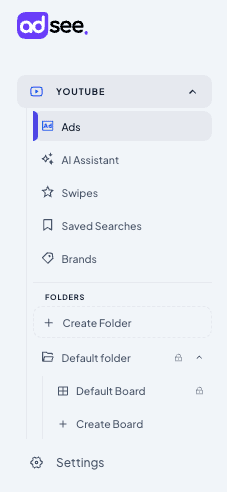
Swipes
Swipes is a one-click save. Star any ad in search results and it goes to your Swipes, ready when you need it. Use it like a bookmark bar while you browse.
Saved Searches
Saved Searches keep a query together with its filters, so you can run the same check again next week. Save a brand search for a competitor with your country filter, sorted by newest, and new creatives appear at the top every time you open it.
Brands
Brands gives each advertiser its own page with its ads and totals for estimated spend, number of ads and views. You can sort the list of brands by estimated spend, ad count or views to see who spends the most in a category.
Folders and boards
Folders hold research projects, and boards inside them hold the ads. A common setup is one folder per client or niche and one board per competitor. Every account starts with a default folder and a default board.
One-click creative report
A creative report analyses every ad on a board and writes up the hooks, angles, offers, CTAs and formats, with each finding linked to the ads behind it, per AdSee AI. A report covers 5 to 30 ads, uses one AI token per analysed ad and is usually ready in a few minutes. It appears in the board's Reports tab.
AdSee AI Assistant: find competitor YouTube ads by asking a question
The AdSee AI Assistant is a chat inside the app that finds ads from a plain-language request in any language, shows them as cards with spend ranges and views, and analyses individual videos for one AI token each, per AdSee AI. Ask "Find YouTube ads for project management software" and it returns cards from Skello, Priority Software, FM2S, ZEP, Bitrix24 Brasil and Zoho, with a link to all 20 matches.
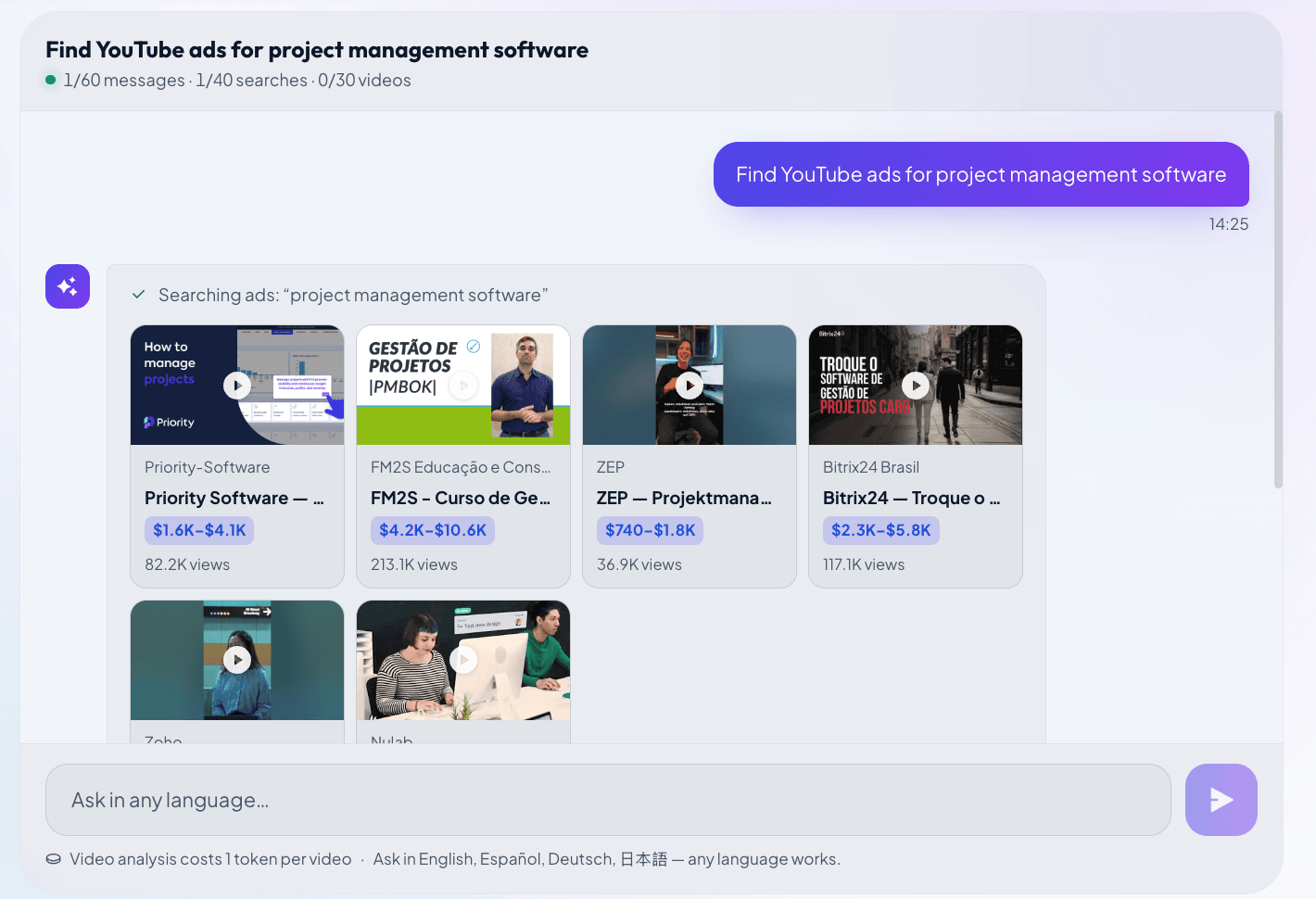
The Assistant is useful when you don't know the right keywords yet. Describe the market, the audience or the angle, and let it choose the search mode. Each chat shows how many messages, searches and video analyses it has used, so you can plan larger research. If you want to try it before signing up, the public AI chat gives 20 searches and one video analysis with no account, per AdSee AI.
AdSee AI MCP: research YouTube ads inside Claude or ChatGPT
The AdSee AI MCP server connects your AdSee account to Claude or ChatGPT in four steps with no API key, so your AI agent can search the library, open ad details, read your boards, save ads and request creative reports from a normal chat, per AdSee AI. MCP stands for Model Context Protocol, an open standard for connecting AI assistants to outside tools.
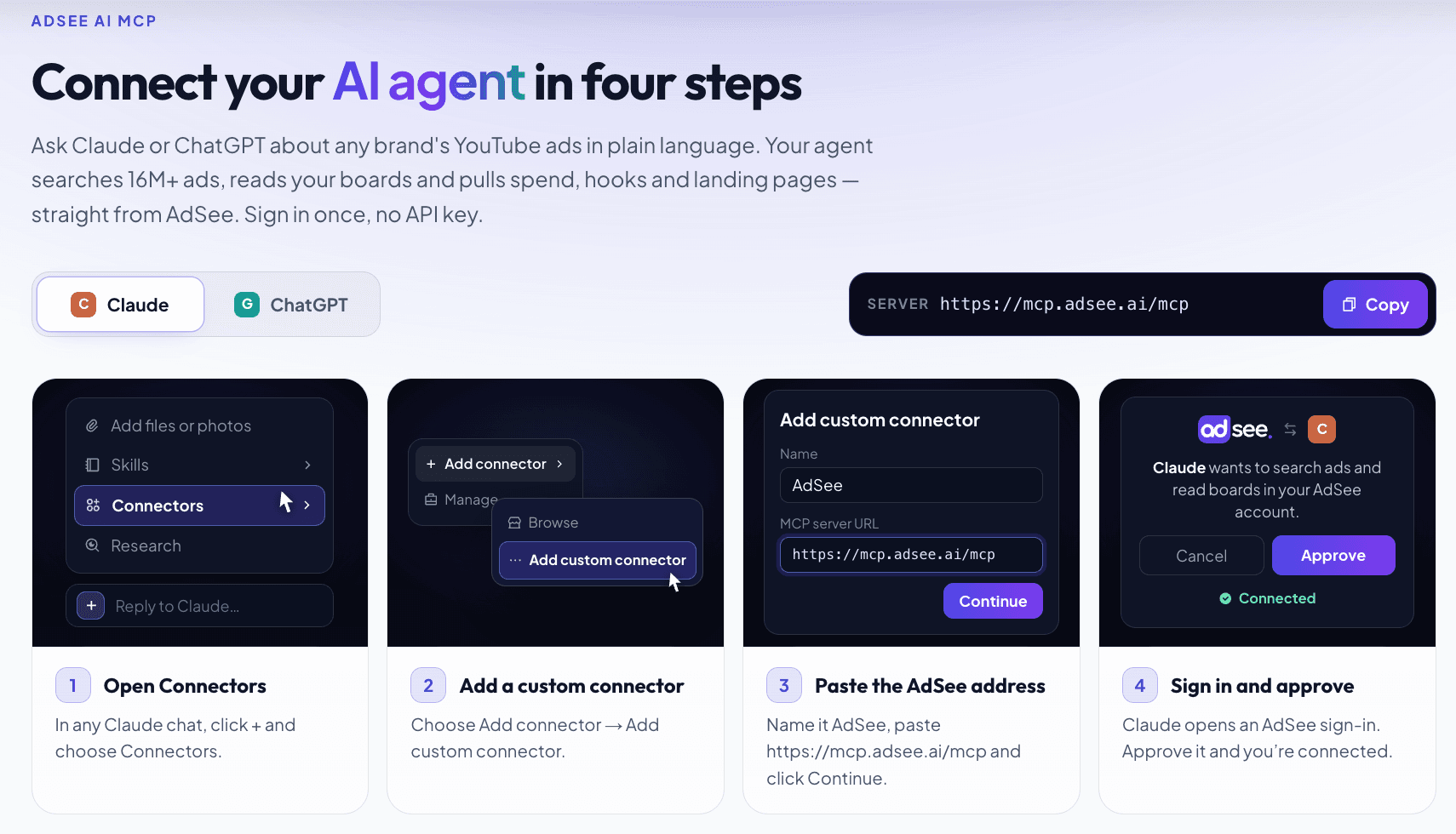
In Claude, open Connectors from the + menu, choose Add custom connector, name it AdSee and paste https://mcp.adsee.ai/mcp, then sign in to AdSee and approve. In ChatGPT, turn on Developer mode under Settings, Apps & Connectors, Advanced, create a connector with the same address and OAuth, then approve the sign-in. Full instructions are on the AdSee AI MCP page.
The value is that the agent can chain steps. One request can be: "Find Todoist's ten most-viewed YouTube ads, compare their hooks, and save the vertical ones to a board called Todoist." The agent only works with your research data. Billing, team and account settings stay in the app, and reports use AI tokens just as they do in the app.
Free competitor report: a rival's YouTube ad strategy in 24 hours
AdSee AI sends a free competitor report within 24 hours: you name a competitor and a market, AI analyses their latest YouTube ads, and the report covers top hooks, core angles, offers, CTAs and formats, per AdSee AI. You don't need an account or a card.
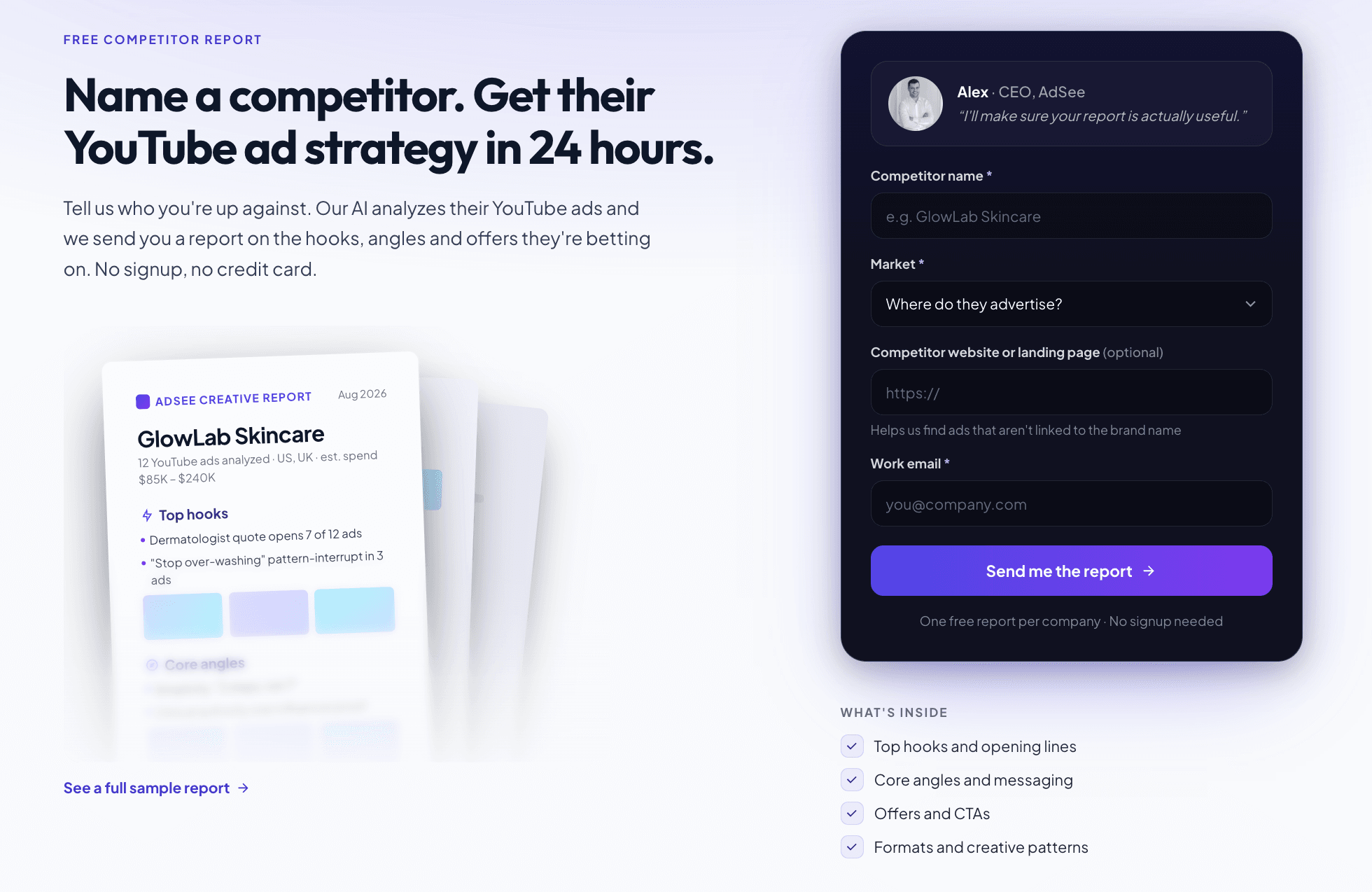
Fill in the form on the AdSee AI homepage with the competitor's name, the market and, if you have it, their website, which helps find ads that aren't linked to the brand name. There is one free report per company. It is a good first step: you see what the competitor is betting on, then you open the cards behind each finding.
Which AdSee AI features are free
Everything in AdSee AI is free until November 1, 2026, including search across the whole library, all filters and spend estimates, per AdSee AI. After that, paid plans split features by depth. Starter includes transcript and ad copy search, spend estimates, landing pages and the last 90 days of ads. Pro adds country placement data, similar-ad search, spend trends and the ad lifecycle, and full history. Curated collections of top ads by industry stay open without sign-up. Check the pricing section for current plans.
A 20-minute YouTube ad tracker routine for one competitor
A weekly YouTube ad tracker routine in AdSee AI takes about 20 minutes per competitor: rerun a saved search, open the new cards, compare them with last week, and log what changed. Here is the sequence.
- Open your saved search for the competitor: brand or domain, your country, sorted by newest.
- Open every ad published since last week. Note the hook, length, orientation and landing page.
- Recheck last week's top ads. Note which ones keep gaining views and which ones stopped.
- Read the country lists. A new ad in one cheap market is a test. An older ad that appears in more markets has been promoted.
- Run a similar-ad search on any new winner to catch its other cuts.
- Save the ads that matter to the competitor's board.
- Once a month, order a creative report on the board to see how hooks and offers shifted.
Keep a simple sheet with one row per ad: date read, views, likes, countries, spend range, landing page. After a month, that sheet tells you more than any single deep dive.
Limitations: where AdSee AI data stops
AdSee AI data shows what a competitor publicly ran and how the public reacted, not whether it made money, so every conclusion from it is a hypothesis to test. Keep these limits in mind:
- Spend is an estimate. It is built from views and country-level cost-per-view benchmarks. The AdSee AI methodology page notes that estimates for low-cost markets are directional and that organic views make an estimate an upper bound.
- Views measure reach. They mix paid and organic plays, and because ad views now count at playback start, they don't show attention.
- Country lists can be incomplete or late, especially for unlisted ads.
- Coverage has limits. The library covers ads recorded from 2025 onward and is deepest in North America, Europe, Australia and Latin America.
- AI fields can be wrong. Transcripts, descriptions and labels are generated automatically. Watch the video before you write a brief based on it.
- Small ads carry little signal. Ads with only a few thousand views are ideas, not evidence.
- Private metrics stay private. CTR, conversions, ROAS, targeting and frequency are not visible in any outside tool.
FAQ: finding and reading competitor ads on YouTube
These are the questions marketers ask most often when they start looking for competitor ads on YouTube, answered briefly with AdSee AI data.
How do I find my competitors' ads on YouTube?
Search inside the ads, not the channel. In the AdSee AI YouTube ad library you can search by brand, domain, spoken words, on-screen text or scene, then filter by country and date. Google's free Ads Transparency Center also lists ads by verified advertiser, but it shows no views or spend and can't search inside the video.
Can I see a competitor's unlisted YouTube ads?
Yes. Unlisted ads don't appear on a channel or in YouTube search, but they still run as ads. AdSee AI records ads as they are served and holds 5M+ unlisted ads among 16M+ in total. It also keeps a copy after the advertiser removes an ad, so you can study campaigns that have already ended.
Is there a YouTube ad library like the Meta Ad Library?
Google's Ads Transparency Center is the closest official equivalent. It lists ads from verified advertisers across Search, YouTube and Display, with region, format and last shown date. For competitive research, AdSee AI adds what it lacks: views, likes, estimated spend, landing pages, country lists and search by what an ad says and shows.
Can I see a competitor's CTR on YouTube?
No. CTR, conversions, ROAS, real costs and targeting exist only in the advertiser's Google Ads account, and no outside tool can show them. AdSee AI offers public signals instead: views, the like-to-view ratio, estimated spend, countries, landing pages and view growth. Google itself says CTR is usually not a priority metric for video campaigns.
What does the view count on a YouTube ad mean?
It is YouTube's public view count: organic views plus ad views. According to Google Ads Help, an ad adds a public view the moment it starts playing, across Shorts, skippable, non-skippable and bumper ads. AdSee AI shows this public number, so treat it as reach, not as proof that people watched the whole ad.
How much is my competitor spending on YouTube ads?
AdSee AI estimates spend per ad as a range: views multiplied by the lowest and highest cost-per-view benchmarks in the countries where the ad ran. Todoist's top ad, with 21.4M views, comes out at $429.4K to $1.07M. Use the range to compare scale between ads and brands, not as an invoice.
How do I track a competitor's new YouTube ads every week?
Use AdSee AI as a YouTube ad tracker. Save a search for the competitor's brand or domain with your country filter, sorted by newest, and rerun it every week. Open new cards, note hooks and landing pages, and recheck which older ads still gain views. A monthly creative report on the competitor's board shows how their strategy shifts.
Can I use AdSee AI inside Claude or ChatGPT?
Yes. AdSee AI runs an MCP server at mcp.adsee.ai/mcp. Add it as a custom connector in Claude, or in ChatGPT's developer mode, then sign in and approve. Your agent can search ads, open ad details, read your boards, save ads and request creative reports. Billing and account settings stay in the AdSee AI app.
Data and sources
Ad data comes from the AdSee AI YouTube ad library, with counters read on October 16, 2026: views, likes, countries, estimated spend and confidence, publish dates, landing pages, hooks and visual descriptions for the Todoist, monday.com and Zoho ads; a brand search for Todoist (24 ads); and a spoken-word search for project management software. Spend estimates multiply views by a country-level cost-per-view range anchored on a US benchmark of $0.02 to $0.05 per view, per the AdSee AI methodology page. The AI Assistant example comes from an in-app chat on October 15, 2026.
External sources: Google Ads Help, About YouTube ads and view metrics; YouTube Help, unlisted videos; YouTube Help, how engagement metrics are counted; Google blog, launch of the Ads Transparency Center (Alejandro Borgia, March 2023); Bloomberg, Dan Taylor on the Ads Transparency Center (March 2023); Google blog, update to dislikes on YouTube (November 2021); Think with Google, ABCD playbook for effective creative on YouTube; Think with Google, video ad creative experiments; Wikipedia: Digital Services Act, UTM parameters, click-through rate, Model Context Protocol.