
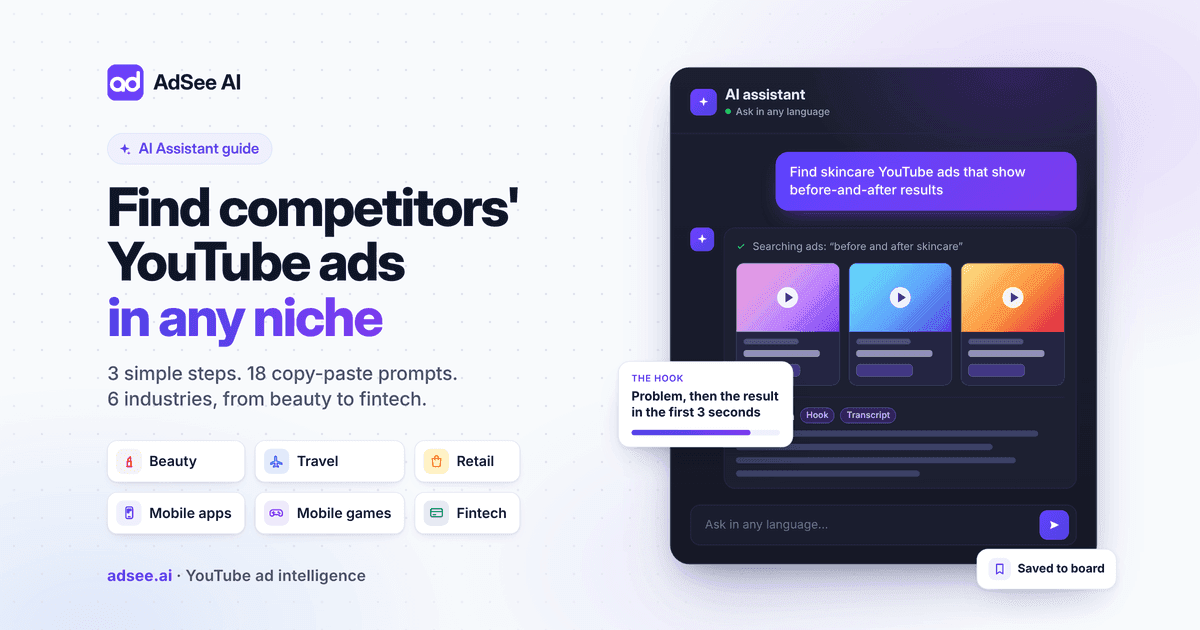
To find your competitors' YouTube ads in any niche, open the AdSee AI Assistant, describe the ads you want in plain words, and ask it to break down the best one. Those three steps work in beauty, travel, retail, mobile apps, mobile games and fintech alike, in any language, across the 16M+ video ads in the AdSee AI library, per AdSee AI.
The stakes are high. Alphabet reported that YouTube earned more than $60 billion in 2025 across ads and subscriptions, and $11.4 billion from ads in the fourth quarter alone, according to its Q4 2025 earnings release. Somewhere in that money are your competitors, testing hooks and scaling the ads that work.
This guide is for beginners. There are no complex models and no long theory. For each of six popular niches you get one market number, prompts you can copy, a real request we ran in the AI Assistant on October 20, 2026, and a screenshot of what came back.
The three steps, in short:
- Open adsee.ai and go to AI Assistant.
- Describe the ads you want: what they show, what they say, which market.
- Ask for a breakdown of the best ad: the hook and the full transcript.
Why you need a YouTube ads library to find competitor ads
You need a YouTube ads library because many competitor ads never appear on the brand's channel: 5M+ of the 16M+ ads in the AdSee AI library are unlisted uploads, per AdSee AI, and YouTube Help confirms that unlisted videos don't appear in a channel's Videos tab, or in YouTube search unless someone adds them to a public playlist.
So scrolling a competitor's channel shows you only part of their advertising. A library records ads as they are served, keeps the ones that were already removed, and lets you search by what the ads show and say. That last part matters most for niche research: you can find competitors you didn't know about, because you search for the idea, not the brand name.
If you want the full tour of filters, ad card fields and the free alternatives, read our complete guide to finding competitor ads on YouTube. This article stays narrow: one tool, the AI Assistant, and six niches.
How to find competitors' YouTube ads in 3 steps with the AdSee AI Assistant
The AdSee AI Assistant is a chat that finds YouTube ads from a plain-language request and shows them as cards with views and estimated spend, and it analyses any single video for 1 AI token, per AdSee AI. You don't need to know search operators or filter names. You describe the ads like you would describe them to a colleague.
Step 1: Open adsee.ai
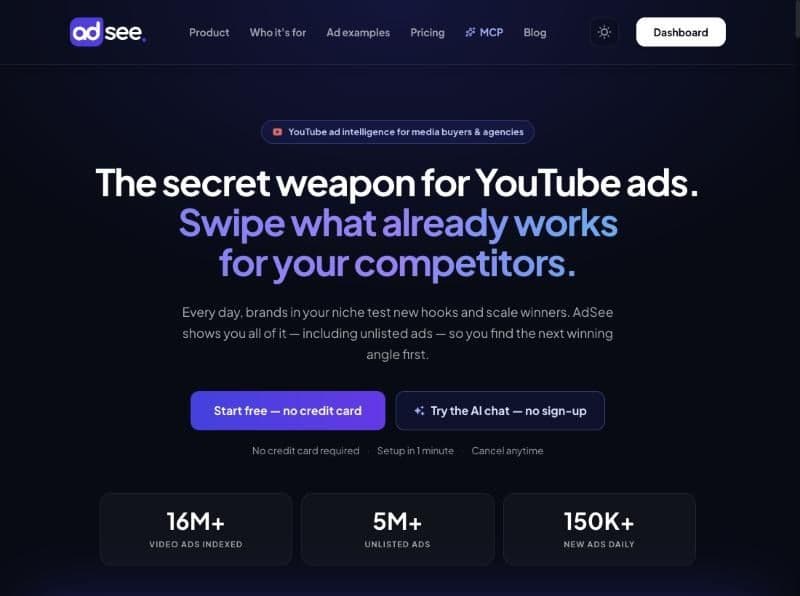
Go to adsee.ai and sign in, or create a free account. No credit card is required. If you want to try the chat first, the public AI chat gives you 20 searches and 1 video analysis with no sign-up, per AdSee AI.
Step 2: Open AI Assistant in the left menu
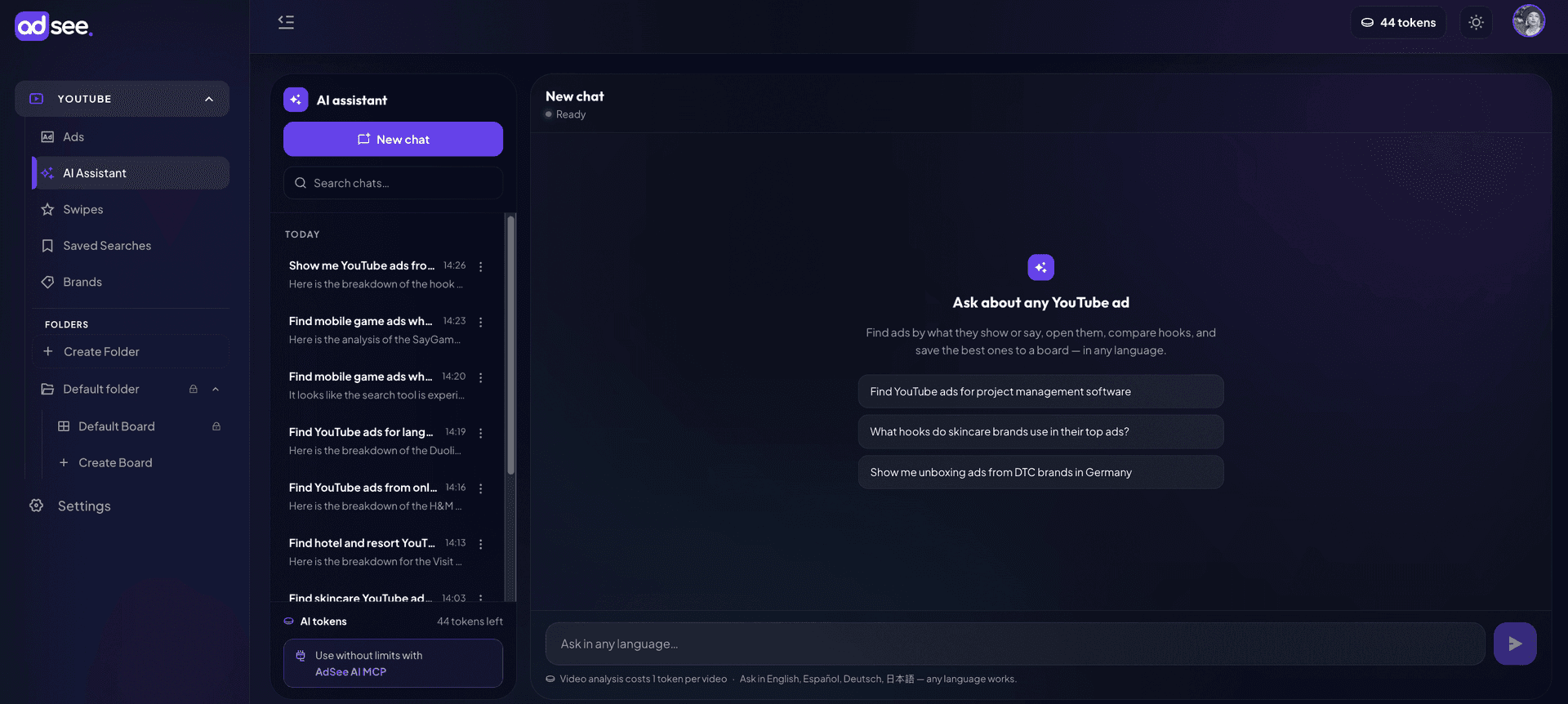
Inside the dashboard, click AI Assistant in the left menu, under YouTube. A new chat opens with three example requests you can click. Every chat you start is saved in the list on the left, so you can come back to your research later.
Step 3: Describe the ads you want
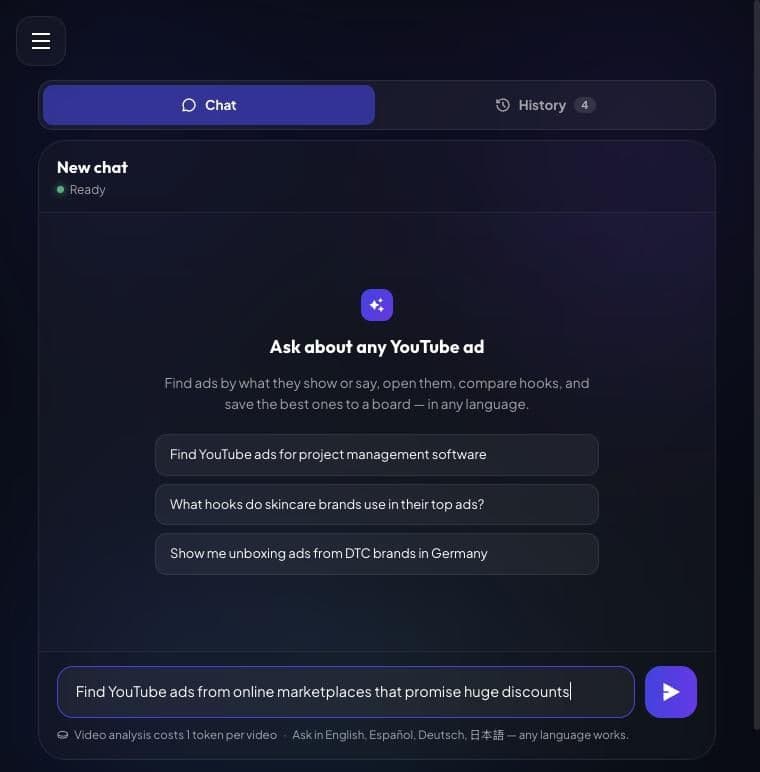
Type your request in the box at the bottom and press Enter. The best requests name three things: what happens in the ad, what is said or written in it, and the market. For example: "Find hotel and resort YouTube ads that open with a drone shot of a beach." The Assistant turns your words into a search, shows the first matching ads as cards and links to the full list.
Step 4: Ask for a breakdown, a hook and a transcript
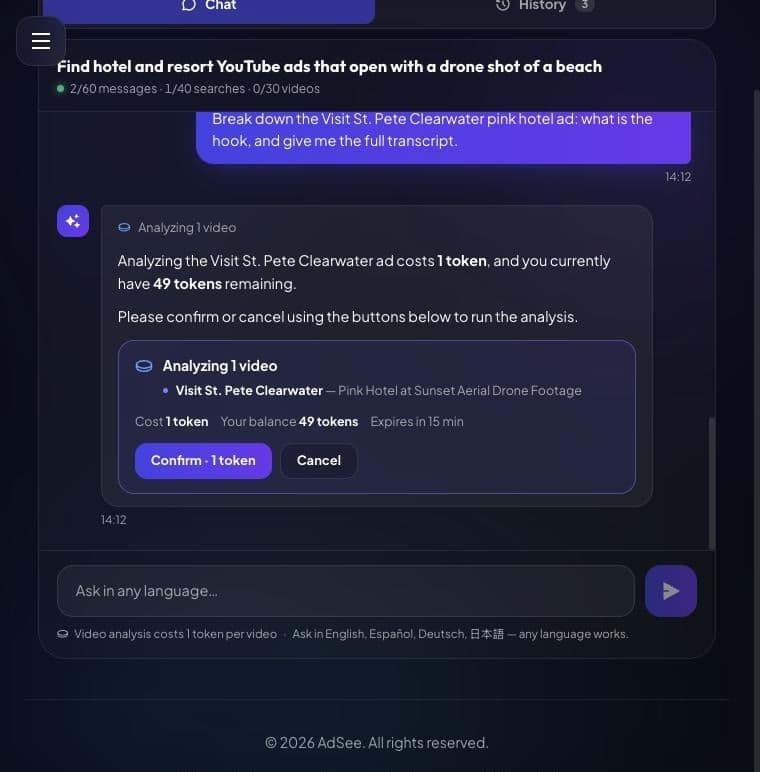
Pick the most interesting ad and ask: "Analyze the [ad name] ad. What is the hook, and give me the full transcript." Before it spends anything, the Assistant shows the cost, 1 token, and your balance, and waits for you to click Confirm, per AdSee AI. Only videos that finish analysing are charged.
The hook is worth this token. Google's ABCD guidelines for effective YouTube creative advise: "Introduce your product or brand in the first five seconds." The breakdown shows you how a competitor handles exactly those seconds.
Beauty and skincare: how to find top YouTube ads from beauty competitors
Beauty is one of the biggest ad spenders in the world: L'Oréal alone spent €14.18 billion on advertising and promotion in 2025, about 32% of its €44.05 billion in sales, according to its 2025 Universal Registration Document. Brands of every size compete for the same viewers, which makes the niche crowded and the top YouTube ads easy to learn from.
Prompts to copy for beauty
- "Find skincare YouTube ads that show before-and-after results"
- "Find YouTube ads with lipstick swatches on the arm"
- "What hooks do skincare brands use in their top ads?"
- "Show me haircare ads where a creator talks to the camera, running in the US"
What the AI Assistant showed for beauty
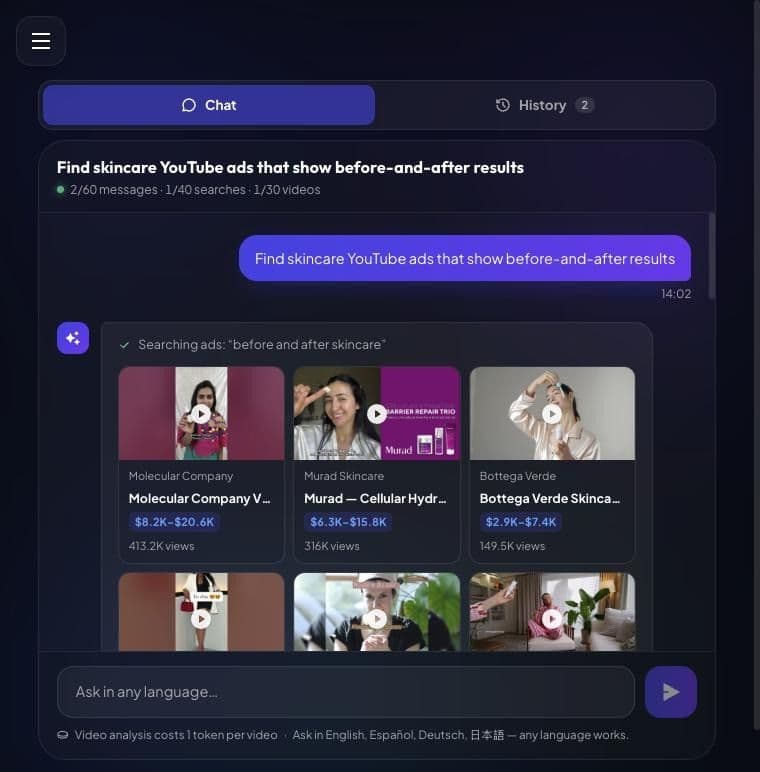
We asked for skincare ads that show before-and-after results. The Assistant searched for "before and after skincare" and returned 20 ads, from Molecular Company's vitamin C serum review with 413.2K views to Murad, Bottega Verde and Allegro, per AdSee AI.
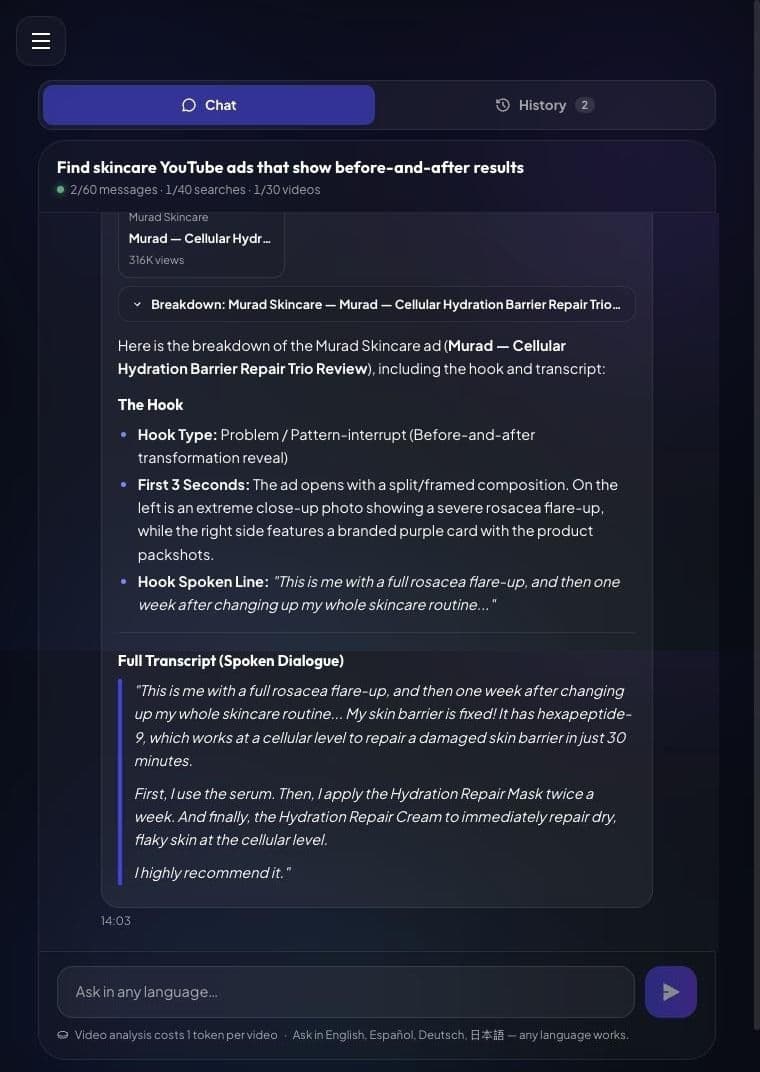
We then asked for a breakdown of Murad's Cellular Hydration Barrier Repair Trio review, a 35-second ad with 316K views and an estimated $6.3K–$15.8K in spend, high confidence, per AdSee AI. The Assistant labelled the hook "Problem / Pattern-interrupt": a split screen with a close-up of a rosacea flare-up on one side and the product on the other. The first spoken line is "This is me with a full rosacea flare-up." The full transcript follows, word for word, so you can see how a 35-second review moves from problem to routine to recommendation.
Travel and tourism: how to find hotel and destination competitors on YouTube
Travel brands spend billions on marketing every year: Booking Holdings invested $8.2 billion in marketing in 2025, up from $7.3 billion in 2024, and Expedia Group invested almost $7.4 billion in direct sales and marketing, according to PhocusWire. Hotels, resorts and tourism boards compete with those budgets for the same travellers.
Prompts to copy for travel
- "Find hotel and resort YouTube ads that open with a drone shot of a beach"
- "Show me tourism board ads for beach destinations running in the US"
- "Find travel booking ads that mention a discount or a free night"
"Show me airline ads in German"
What the AI Assistant showed for travel
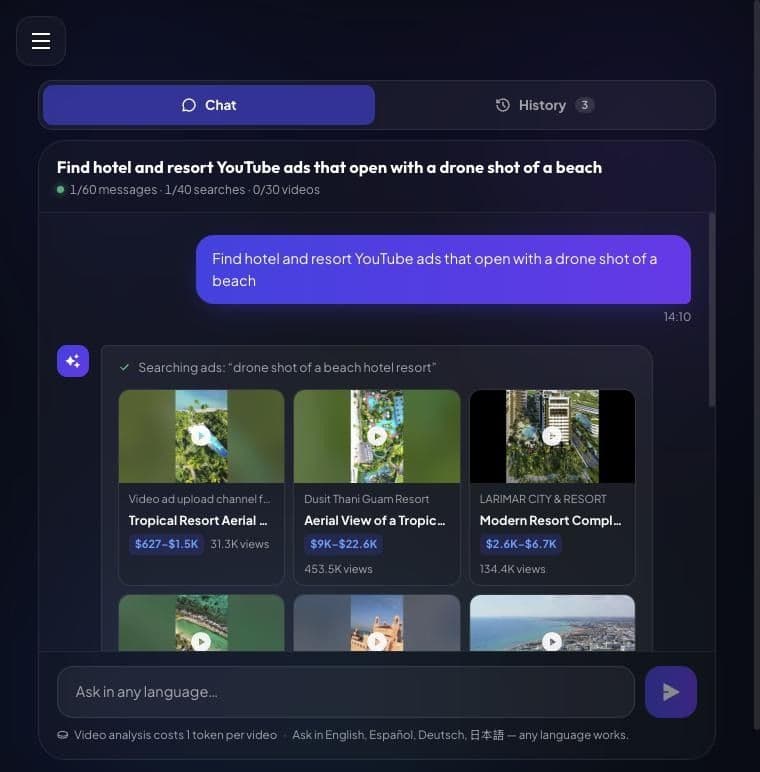
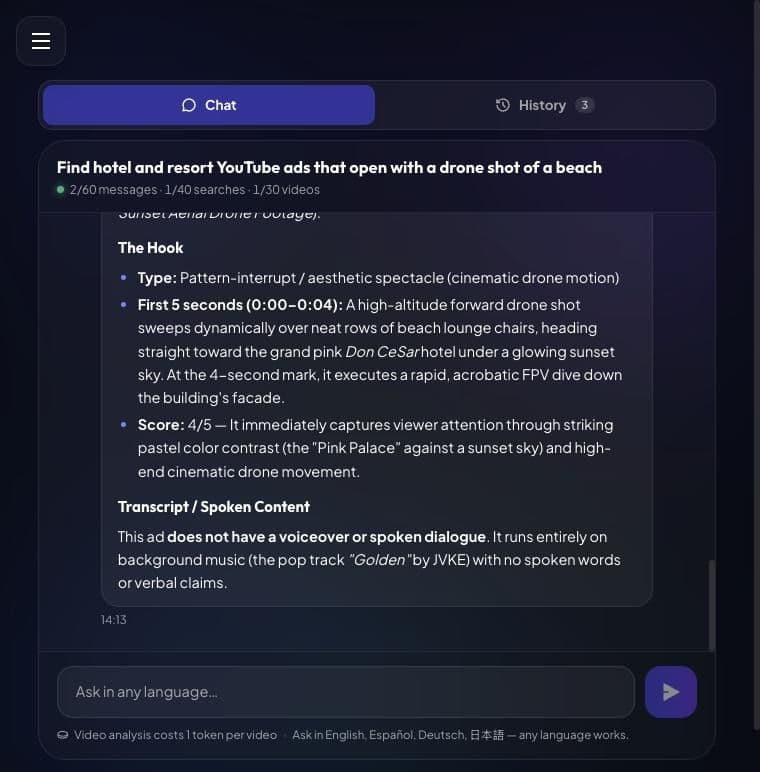
The Assistant searched for "drone shot of a beach hotel resort" and returned 20 ads, including Dusit Thani Guam Resort with 453.5K views and the biggest one in the set, Visit St. Pete Clearwater's "Pink Hotel at Sunset Aerial Drone Footage," with 3.2M views and an estimated $65.1K–$162.8K in spend, high confidence, per AdSee AI.
The breakdown of that 24-second vertical ad was short and useful. The hook is a "pattern-interrupt / aesthetic spectacle": a drone sweeps over rows of beach loungers toward the pink Don CeSar hotel at sunset, then dives down the facade at the four-second mark. The Assistant scored it 4 out of 5. The transcript section says the ad has no voiceover at all, only music. That is a finding in itself: for a destination, the picture can do the whole job.
One more beginner tip: open the ad card and look at the landing page link. Here the advertiser's own campaign tag reads "Affluent FamilyTravelers_Shorts_Golden_hour", per AdSee AI, so you can see the audience and the format the ad was built for.
Retail and e-commerce: how to find discount and sale ads from competitors
Online retail runs on advertising: PDD Holdings, the parent company of Temu, reported sales and marketing expenses of RMB125.3 billion, or US$17.9 billion, for 2025, about 29% of its revenue, according to its fiscal 2025 results. Retailers of every size fight for the same shoppers with sales, coupons and new arrivals.
Prompts to copy for retail
- "Find YouTube ads from online marketplaces that promise huge discounts"
- "Show me fashion sale ads shorter than 10 seconds, running in the US"
- "Find grocery store ads that show new products"
- "Find furniture store ads with a clearance sale"
What the AI Assistant showed for retail
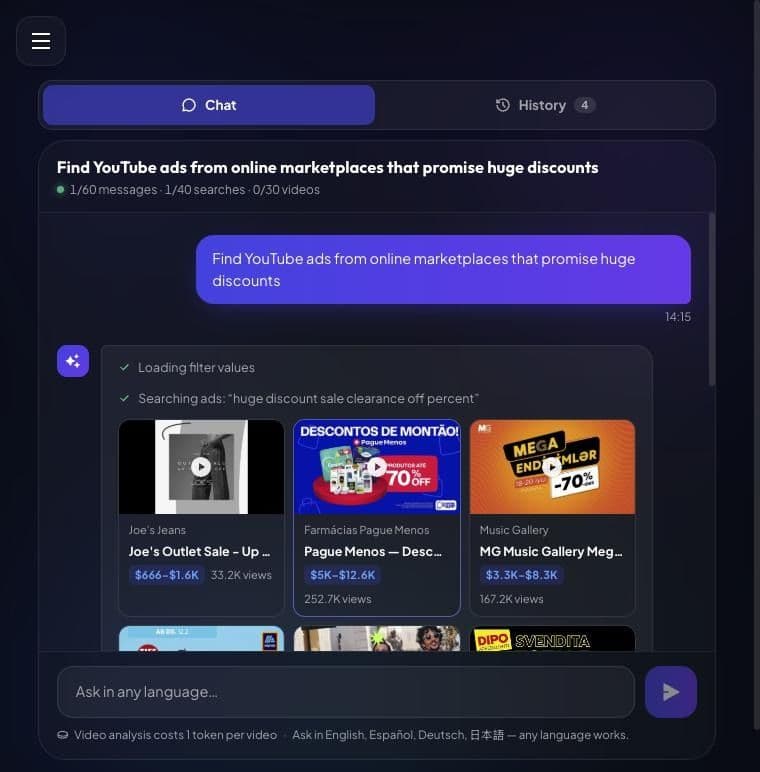
The Assistant searched for "huge discount sale clearance off percent" and returned 20 ads with offers from 60% to 80% off, from Joe's Jeans and H&M in the US to DIPO in Italy and Slovenia and 220.lv in Latvia, per AdSee AI. Notice that it also returned a pharmacy chain and a furniture store. The search matches the idea of a big discount, so check that each result really sells what you sell.
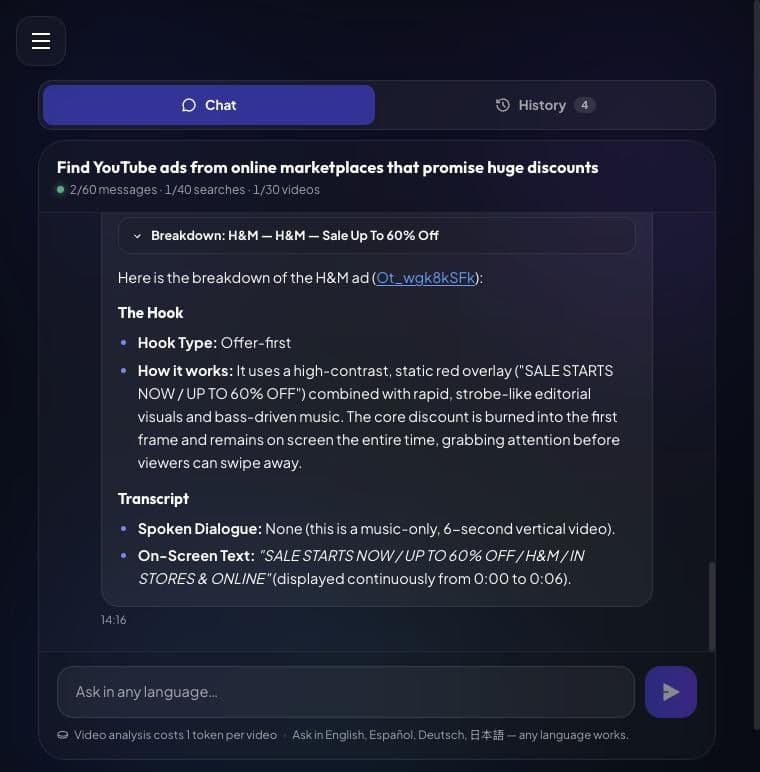
We asked for a breakdown of H&M's "Sale Up To 60% Off," a 6-second vertical ad with 556.1K views and an estimated $11.1K–$27.8K in spend, high confidence, per AdSee AI. The hook type is "offer-first": a red overlay with "SALE STARTS NOW / UP TO 60% OFF" stays on screen for all six seconds, over fast fashion shots and bass-heavy music. There is no spoken dialogue, so the transcript lists the on-screen text instead. For a retail brand, that is the lesson in one line: in six seconds, the offer is the ad.
Mobile apps: how to find app install ads from your competitors
Apps outside gaming are now the biggest buyers of mobile users: non-gaming apps spent $53 billion on user acquisition in 2025, up 18%, out of $78 billion in total, according to AppsFlyer's 2025 Mobile App Trends. Much of that money goes to video, which is why YouTube is full of app install ads.
Prompts to copy for mobile apps
- "Find YouTube ads for language learning apps"
- "Find fitness app ads that show the app screen"
- "Show me budgeting app ads in Spanish"
- "Find meditation app ads with a creator talking to the camera"
What the AI Assistant showed for mobile apps
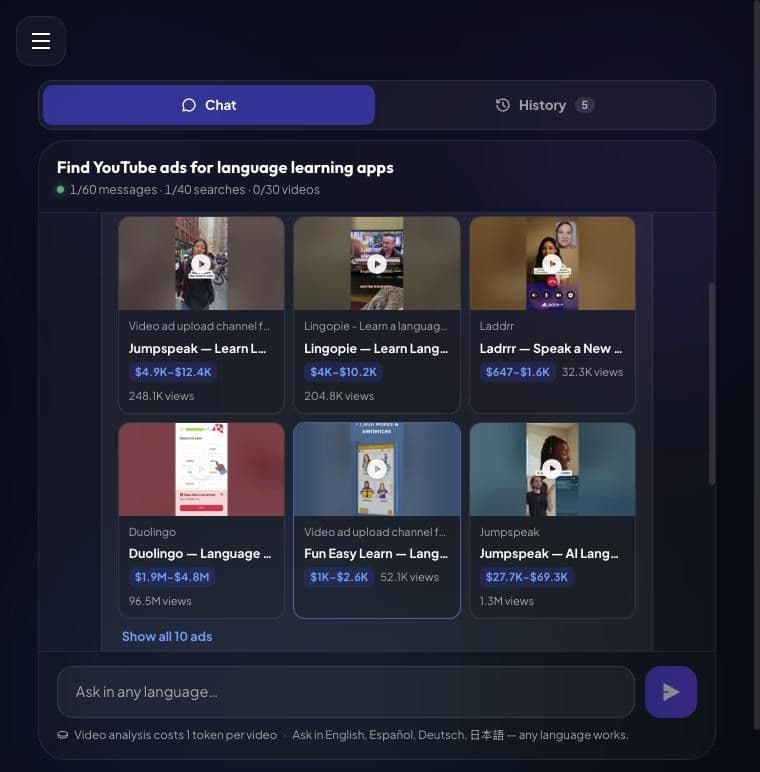
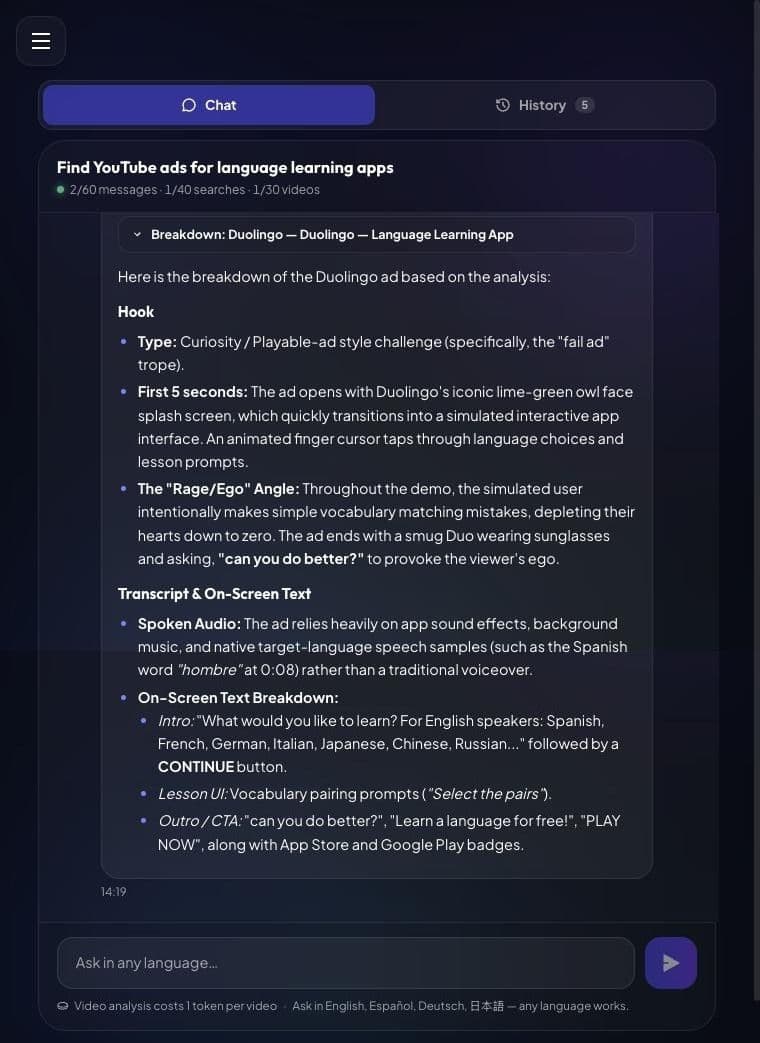
The Assistant searched for "learn a language app" and returned 10 ads from Duolingo, Jumpspeak, Lingopie, DuoCards, Laddrr and Reverso, per AdSee AI. One card stands out at once: a Duolingo ad with 96.5M views and an estimated $1.9M–$4.8M in spend, high confidence. AdSee AI recorded this 30-second vertical ad in 56 countries.
The breakdown explains why it travels so well. The hook is a "playable-ad style challenge," the "fail ad" trope: an animated finger taps through a Duolingo lesson, makes simple mistakes and runs out of hearts. Then Duo appears in sunglasses and asks, "can you do better?" There is no classic voiceover, only app sounds, music and a few words in the target language. The ad doesn't explain the app. It makes you want to play it.
Mobile games: how to find competitor game ads on YouTube
Mobile games remain a huge ad category: gaming apps spent $25 billion on user acquisition in 2025, up 3%, according to the same AppsFlyer report. Game studios test creatives faster than almost anyone, so a quick look at their ads shows you what holds attention right now.
Prompts to copy for mobile games
- "Find mobile game ads where the player fails a puzzle level"
- "Find playable-style ads for word games"
- "Show me mobile game ads with a 'can you beat this level' challenge"
- "Find ads for idle games running in Japan"
What the AI Assistant showed for mobile games
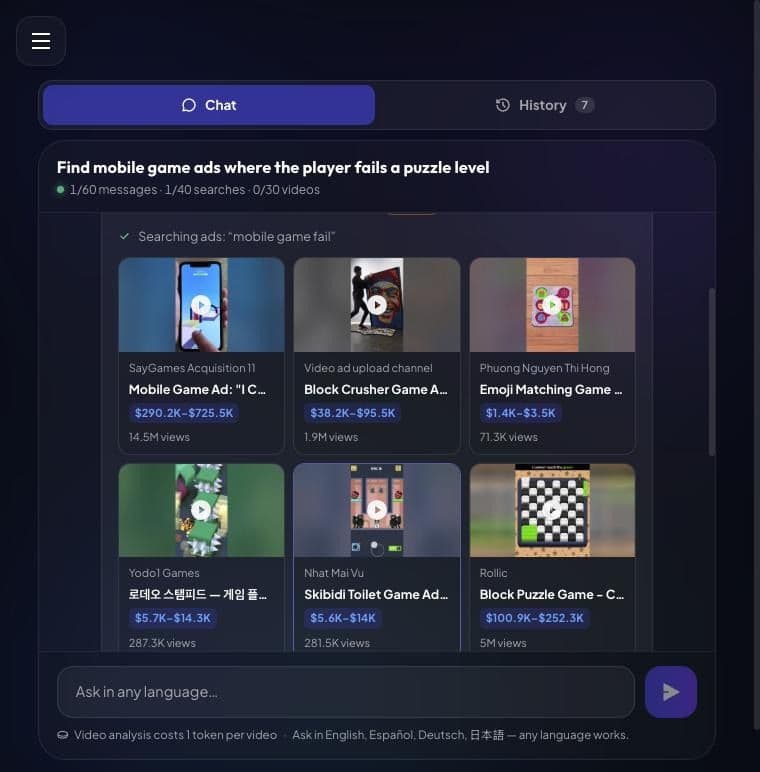
On the first try, the search tool reported a temporary error, so we sent the same request again a minute later. The second time, the Assistant searched for "mobile game fail" and returned 8 ads, led by SayGames' "I CAN'T WIN" Level Failures ad with 14.5M views and an estimated $290.2K–$725.5K in spend, low confidence, and Rollic's "Cannot Reach Green" block puzzle with 5M views, per AdSee AI.
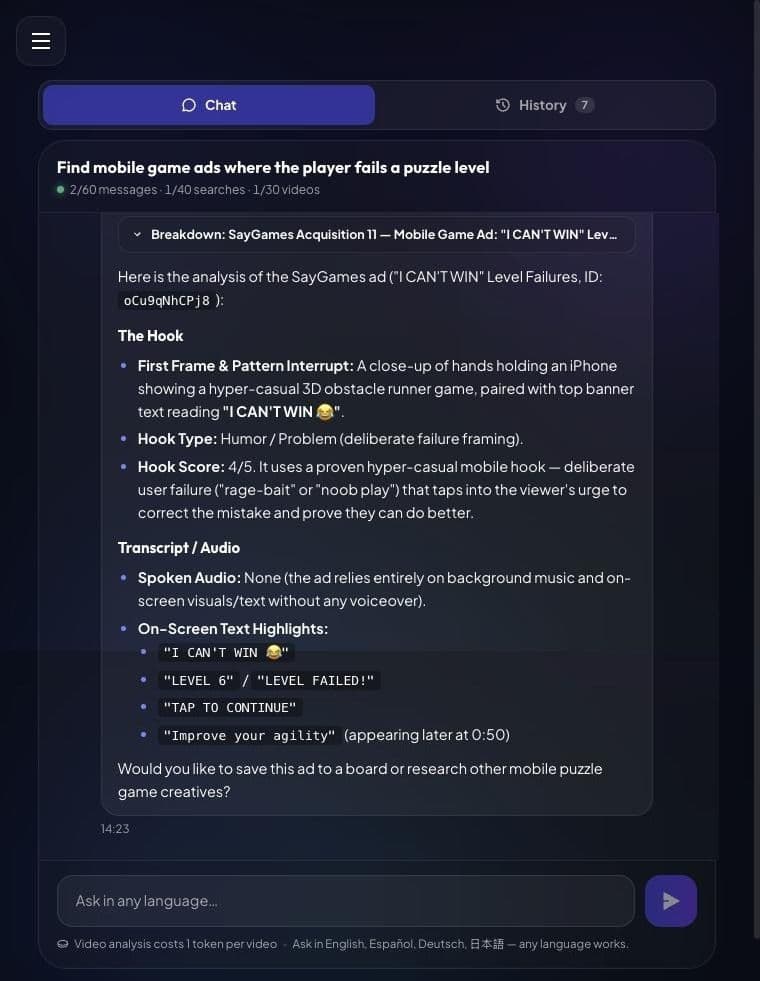
The SayGames breakdown describes a humour and problem hook: hands hold an iPhone with a simple 3D obstacle runner, the banner says "I CAN'T WIN 😂", and the player keeps failing. The Assistant scored the hook 4 out of 5 and explained the trick: deliberate failure makes viewers want to prove they can do better. There is no voiceover, so the transcript lists the on-screen text, from "LEVEL FAILED!" to "TAP TO CONTINUE". If that sounds familiar, it should: it is the same "can you do better?" idea as the Duolingo ad in the previous niche.
Fintech: how to find neobank and money transfer ads from competitors
Financial brands are spending more on ads each year: US financial and insurance companies grew total media ad spending 17.8% in the first half of 2025, to $5.9 billion, according to MediaRadar data reported by EMARKETER. In fintech, trust is the product, so the way a competitor builds trust in 30 to 60 seconds is worth studying.
Prompts to copy for fintech
- "Show me YouTube ads from neobanks and money transfer apps running in the UK"
- "Find credit card ads that promise cashback"
- "Find crypto exchange ads in Spanish"
- "Show me investing app ads that explain fees"
What the AI Assistant showed for fintech
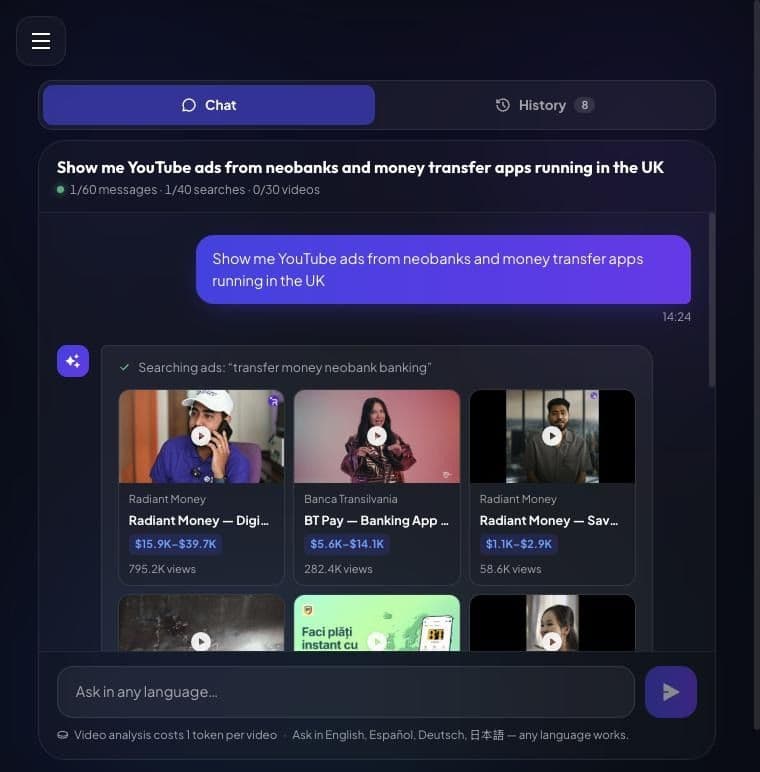
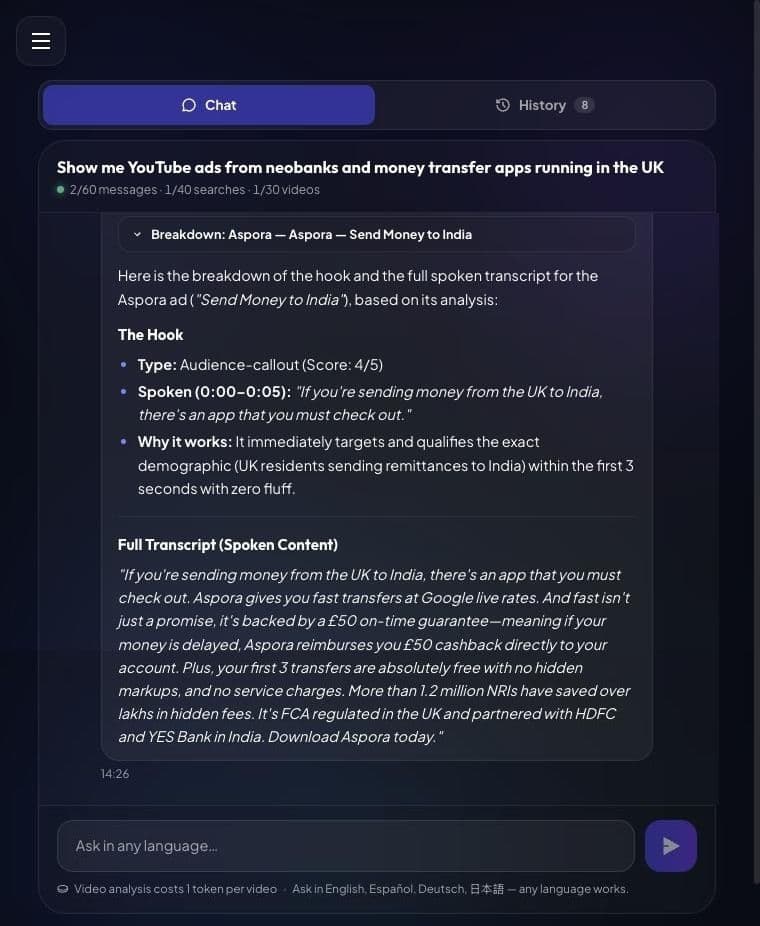
The Assistant searched for "transfer money neobank banking" and returned 20 ads from Radiant Money, Airwallex, Banca Transilvania's BT Pay, Taptap Send, XE, TransferGo and Aspora, per AdSee AI. It also grouped them by angle: business banking, cheap transfers, and remittances to one country.
We asked for a breakdown of Aspora's "Send Money to India," a 57-second ad with 4.6M views and an estimated $92.5K–$231.3K in spend, low confidence, recorded in the UK, Ireland, Sweden and Romania, per AdSee AI. The Assistant labelled the hook an "audience callout" and scored it 4 out of 5. The first spoken line is "If you're sending money from the UK to India, there's an app that you must check out." The full transcript follows: rates, a £50 on-time guarantee, free first transfers, regulation and bank partners. In a few seconds of reading, you see every trust signal the competitor chose to pay for.
Prompt cheat sheet: 18 AI Assistant prompts for 6 niches
The table below collects 18 ready prompts, three per niche, based on the requests that worked in the AdSee AI Assistant on October 20, 2026, per AdSee AI: one to find ads, one to narrow them to a market or format, and one to break down the best result. Swap in your own product, country and language.
| Niche | Find ads | Narrow it down | Break it down |
|---|---|---|---|
| Beauty | Find skincare YouTube ads that show before-and-after results | Show me haircare ads with creators, running in the US | Analyze the [ad] ad: hook and full transcript |
| Travel | Find hotel and resort ads that open with a drone shot of a beach | Show me tourism board ads running in Germany | What is the hook of the [ad] ad, and is there a voiceover? |
| Retail | Find ads from online marketplaces that promise huge discounts | Show me fashion sale ads shorter than 10 seconds | Analyze the [ad] ad: hook and on-screen text |
| Mobile apps | Find YouTube ads for language learning apps | Show me budgeting app ads in Spanish | Analyze the [ad] ad: hook and full transcript |
| Mobile games | Find mobile game ads where the player fails a puzzle level | Find playable-style ads for word games | What is the hook of the [ad] ad? |
| Fintech | Show me neobank and money transfer ads running in the UK | Find credit card ads that promise cashback | Analyze the [ad] ad: hook and full transcript |
What to do with the competitor ads you find
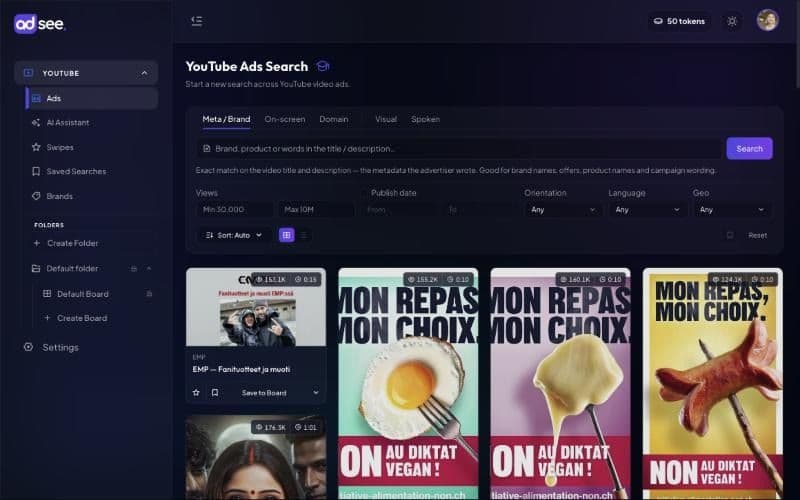
Save the ads worth keeping to a board, so your research becomes a swipe file you can reopen and share instead of a chat you forget. In AdSee AI, every ad card has a Save to Board button, and boards sit in folders, so you can keep one folder per competitor or per niche, per AdSee AI. Think of it as Pinterest for YouTube ads.
Three simple habits help beginners most:
- Keep one board per competitor. Add every new ad you find, so you can see their creative history in one place.
- Look for repeats. When the same idea shows up across brands, as the fail-ad hook did in apps and games, it is a pattern worth testing yourself.
- Come back every week. Rerun the same request and open what is new. That turns the Assistant into a simple YouTube ad tracker.
You can also open any ad card and use Find similar ads, by visuals or by script, to pull more ads like the one you liked, per AdSee AI.
Tips for writing better AI Assistant prompts
The AdSee AI Assistant returns sharper results when a prompt describes the ad rather than the category: our request for skincare ads "that show before-and-after results" returned 20 ads built around one angle, per AdSee AI. A request for just "skincare ads" would return a wide mix, which is less useful when you want to learn a structure.
Suzana Apelbaum of Google's Media Lab described the shift in their own planning in Think with Google: "we moved from a 'reach plus frequency' approach to 'reach plus relevance plus frequency.'" Niche research is how you find the relevant part. Five tips:
- Describe what is on screen: a drone shot, a split screen, a hand holding a phone, a creator talking to the camera.
- Quote what is said or written: "free first transfer," "up to 60% off," "can you do better."
- Name the market: a country or a language narrows the results to ads that ran there.
- Name the format: vertical, under 10 seconds, a review, an unboxing.
- Write in your own language: the Assistant accepts English, Español, Deutsch, 日本語 and any other language, per AdSee AI.
Limits: what the AI Assistant can and can't tell you
The AI Assistant shows what competitors publicly ran and how many people saw it, not whether an ad made money, so treat every finding as an idea to test. Keep these limits in mind:
- Spend is an estimate. AdSee AI shows a range and a confidence level. In this guide, the H&M, Murad, Duolingo and St. Pete estimates are high confidence, and the SayGames and Aspora estimates are low confidence.
- Views measure reach. They show how widely an ad was shown, not how many people watched to the end.
- Results are matches, not a shortlist. Our discount search also returned a pharmacy and a furniture store. Check each brand before you save it.
- Transcripts need speech. Many ads in this guide had no voiceover. In that case the Assistant lists the on-screen text instead.
- Video analysis costs tokens. Each breakdown costs 1 token, and the Assistant asks you to confirm first.
- Search can fail for a moment. When it does, the Assistant says so. Send the same request again.
FAQ: finding competitors' YouTube ads by niche
These are the questions beginners ask most often about finding competitor ads on YouTube in a specific niche, answered briefly with AdSee AI data.
How do I find my competitors' YouTube ads?
Open the AdSee AI Assistant and describe the ads you want: what they show, what they say and which market. It searches the AdSee AI YouTube ads library of 16M+ ads, including 5M+ unlisted ones, and returns ad cards with views and estimated spend. Then ask it to break down the best ad, with the hook and the full transcript.
Is there a YouTube ads library for my niche?
There is no separate library per niche. In AdSee AI, your request defines the niche: describe the product, the scene or the offer, and the AI Assistant finds matching ads across the whole library of 16M+ ads. AdSee AI also publishes free, hand-picked collections of top YouTube ads for 12 industries that anyone can browse without signing up.
How much do brands spend on YouTube ads?
YouTube earned $11.4 billion from ads in the fourth quarter of 2025, according to Alphabet's earnings release. For single ads, AdSee AI shows an estimated range: in this guide, a Duolingo ad with 96.5M views is estimated at $1.9M–$4.8M, and an H&M sale ad with 556.1K views at $11.1K–$27.8K, both high confidence.
Are the spend numbers in the AI Assistant exact?
No. They are estimates, shown as a range with a confidence level, and AdSee AI calculates them from public views and country-level cost benchmarks. Use them to compare the scale of ads and brands, not as an invoice. Low-confidence estimates, like the SayGames and Aspora examples in this guide, deserve extra caution.
Can the AdSee AI Assistant give me the transcript of an ad?
Yes. Ask for "the hook and the full transcript" and confirm 1 token. For ads with speech, such as the Murad and Aspora examples, AdSee AI returns the spoken words in full. For music-only ads, such as the H&M, St. Pete Clearwater and SayGames examples, it says there is no voiceover and lists the on-screen text instead.
Do I need to write prompts in English?
No. The AdSee AI Assistant accepts requests in English, Español, Deutsch, 日本語 and other languages, per AdSee AI. You can also ask for ads in a specific language or country, for example "Show me budgeting app ads in Spanish," to see how competitors pitch in markets where you plan to launch.
How do I track my competitors' new YouTube ads every week?
Use the AdSee AI Assistant as a simple YouTube ad tracker. Keep one board per competitor, rerun the same request every week, and save the new ads you find. Any YouTube ads spy tool can show you a single ad, but a board you update weekly shows how a competitor's hooks and offers change over time.
Is the AdSee AI Assistant free to try?
Yes. The public AI chat at adsee.ai/try gives you 20 searches and 1 video analysis with no sign-up, per AdSee AI. Creating an account is free and needs no credit card. Inside the app, searches are part of your plan, and each video breakdown costs 1 AI token, which the Assistant asks you to confirm.
Data and sources
Ad data comes from the AdSee AI YouTube ads library and AI Assistant chats run on October 20, 2026: requests and results for skincare before-and-after ads, beach resort drone ads, discount retail ads, language learning apps, mobile game fail ads and UK money transfer apps, plus breakdowns of the Murad, Visit St. Pete Clearwater, H&M, Duolingo, SayGames and Aspora ads. Views, estimated spend and confidence, length, countries and landing pages were checked on each ad's card the same day. For more ad examples by niche, see our guide to the best YouTube ad examples.
External sources: Alphabet Q4 2025 earnings release; YouTube Help, unlisted videos; L'Oréal 2025 Universal Registration Document; PhocusWire, OTA marketing spend 2025; PDD Holdings fiscal 2025 results (Form 6-K); AppsFlyer, 2025 Mobile App Trends; EMARKETER, citing MediaRadar, on financial and insurance ad spending in H1 2025; Think with Google, ABCD guidelines for YouTube creative; Think with Google, "What we learned when we challenged our own video marketing formula" (February 2024).