
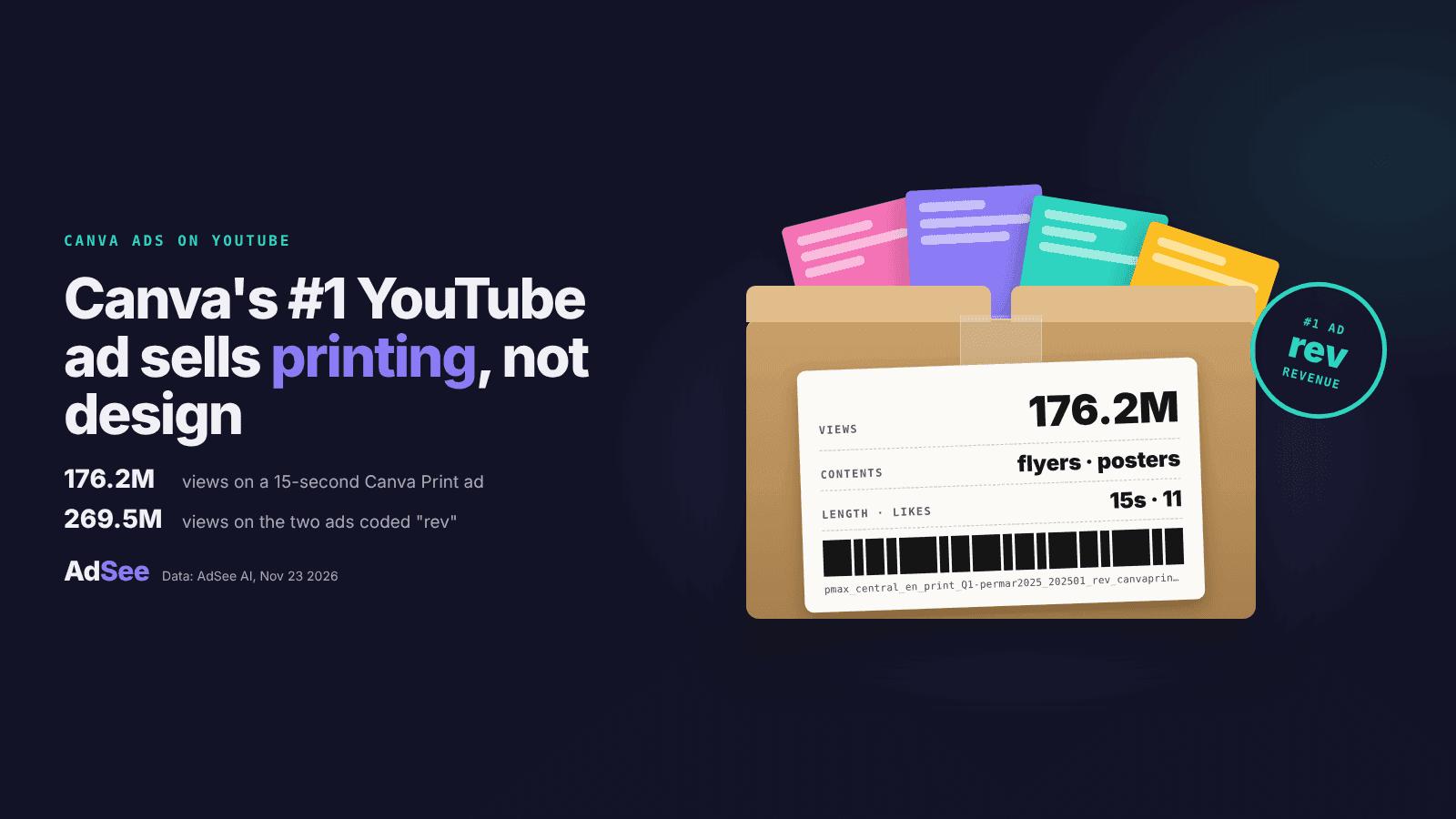
Canva's 20 most-viewed YouTube ads reached 1.1B views, and the biggest one, with 176.2M views, sells printing, not design software, per AdSee AI data pulled on November 23, 2026. It is a 15-second ad for Canva Print, the service that turns a design into a box of physical posters and cards.
Canva is an online design platform founded in Perth, Australia, in 2013 by Melanie Perkins, Cliff Obrecht and Cameron Adams, and now based in Sydney. According to Wikipedia, it bought Serif, the maker of the Affinity design suite, in March 2024. On YouTube, Canva rarely sells the idea of design. It sells finished things: a printed flyer, a fixed poster, a food video, a cleaner recording.
Canva's top YouTube ads in numbers
Canva has 272 YouTube ads on AdSee AI's Canva page, with 2.2B views and an estimated $4.4M–$109M in all-time spend, per AdSee AI. They ran in 58 countries, mostly in English, with some in Portuguese and French. The top 20 at a glance:
- 1.1B views across the top 20 ads, about half of all Canva views
- The #1 ad has 176.2M views, 16% of the top 20
- 11 of the top 20 run 15 seconds or less, and 2 run 6 seconds
- 4 ads promote Magic Layers, with 223.1M views
- 5 ads sell video features, with 240.2M views
Views on YouTube ads are mostly paid reach: they show where the budget went, not how viral an ad was. Spend is an estimate AdSee AI derives from views and typical cost-per-view rates. You can browse the full set on AdSee AI's Canva page in its YouTube ads library.
The #1 ad: a box of prints
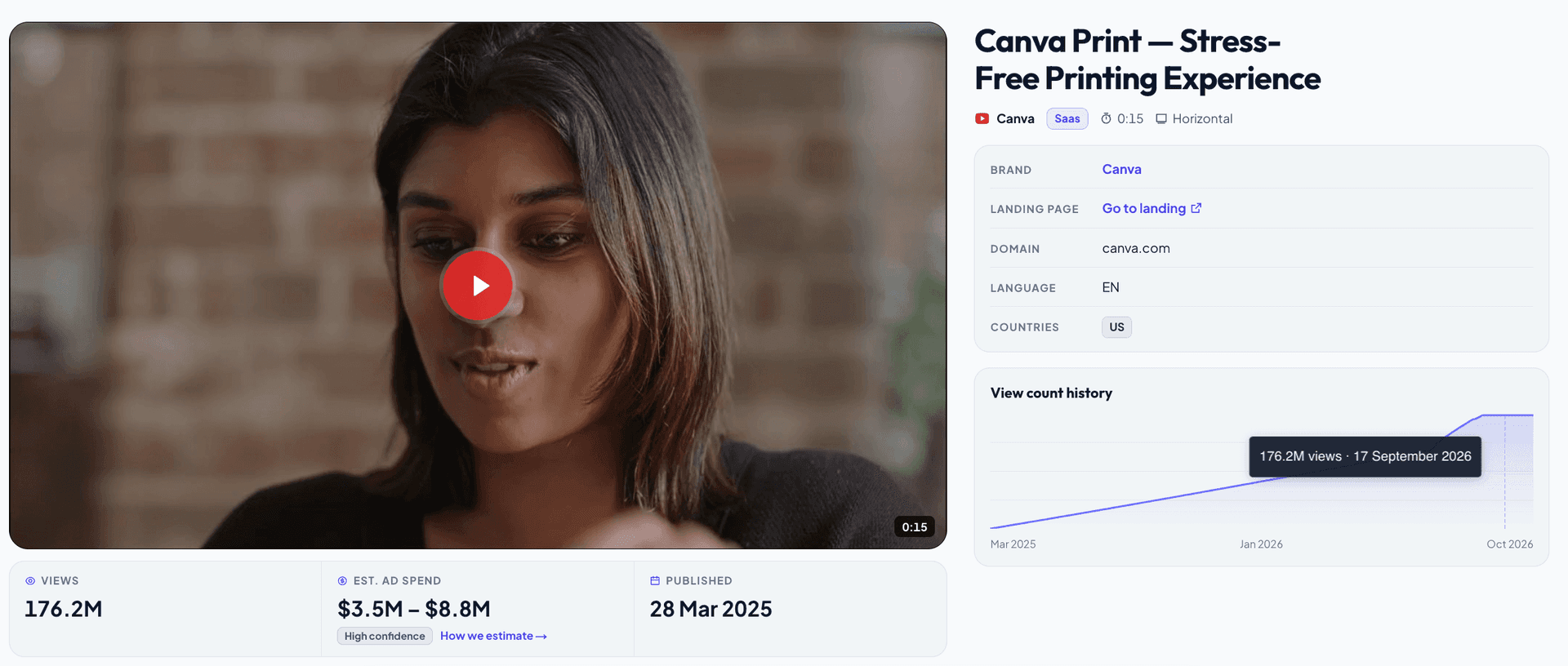
Per AdSee AI, Canva's most-viewed YouTube ad is "Canva Print — Stress-Free Printing Experience", a 15-second spot published on March 28, 2025, with 176.2M views and an estimated $3.53M–$8.81M in spend. It ran in the US and has 11 likes.
The ad opens on a gradient and one question: "Want a stress-free printing experience?" Then comes a montage of Canva designs, flyers for a flea market and a warehouse sale among them, and a person opening a Canva-branded box of printed materials. It ends on the quality of the print.
The ad's real title is a campaign code: "pmax_central_en_print_Q1-permar2025_202501_rev_canvaprint_print-happiness-guarantee_printproducts_mo". Read left to right, it names Performance Max, the print team, the first quarter of 2025, a revenue goal and a "print happiness guarantee". The click goes to Canva's custom print templates.
Printing is how a free design tool earns money from people who will never pay for a subscription. A user who designs a flyer for free can still pay to have it delivered.
Print beyond the #1 ad
Printing appears twice in Canva's top 20 YouTube ads, per AdSee AI: the #1 Canva Print spot and a 30-second ad titled "Design and Print Custom Merchandise", with 32.3M views. Together the two hold 208.5M views, close to a fifth of the top 20.
The second ad moves from paper to products such as shirts and bags. The logic is the same as in the #1 spot: the design is free, and the physical result is what Canva charges for.
This matters for any brand with a free tier. The free product brings people in, but the ad budget follows the moment a user is ready to pay. For Canva, one of those moments is when a design has to leave the screen and become something a customer can hold, hang on a wall or hand out at an event.
Magic Layers: an AI mistake as the hook
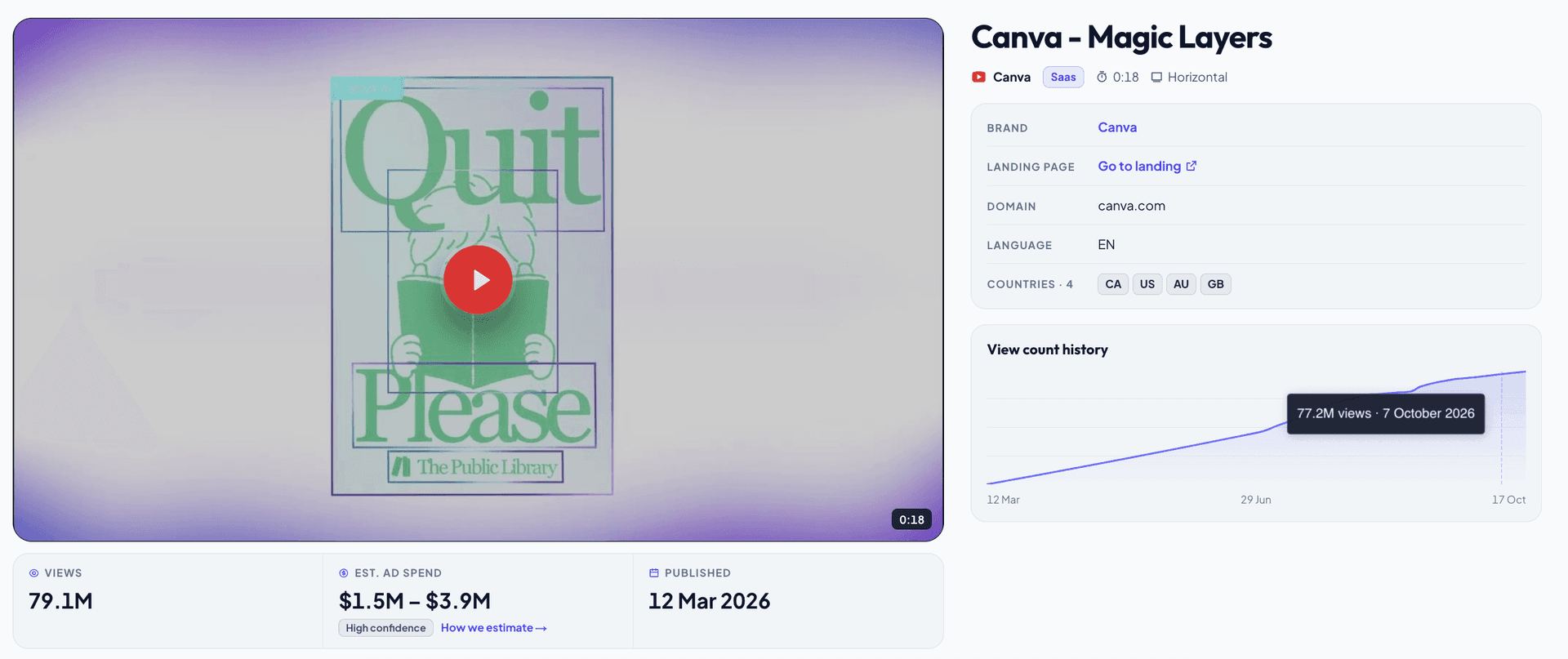
Canva's AI feature Magic Layers is the biggest single product theme in its top 20 YouTube ads, per AdSee AI: four ads with 223.1M views. The most-viewed, "Canva - Magic Layers", has 79.1M views and was published on March 12, 2026, in Canada, the US, Australia and the UK.
It starts with a search bar: "Make me a library poster." The AI draws a person reading and writes "Quit Please" instead of "Quiet Please". The ad does not hide the mistake. It shows the editing panel, Magic Layers splits the poster into parts, the typo is fixed, and the last shot is a bookmark that reads "Quiet Please" in a real library.
Most AI ads promise a perfect first result. This one admits the first result is wrong and sells the fix. For a design tool, that is the honest promise: AI gets you close, and Canva lets you edit the rest.
The ad's internal name, "NAMR26003 M036 BRF01 Hero Mag Layer Vid 15S 16x9 V01", calls it a 15-second hero video, although the published cut runs 18 seconds.
The 6-second brand spot
Canva's 6-second brand ad "Make your thing a thing" has 75.4M views and 551 likes, the most likes of any Canva ad checked for this teardown, per AdSee AI. It was published on April 23, 2026, in the US and Canada.
A woman looks at her phone, which shows a poster with a squirrel on it. She walks past a fence covered in similar posters, each with a different animal. The last shot is an aerial view of a large crowd in a park, with the Canva logo. The description says: "Canva gives you everything you need to make that thing a thing."
There is no feature, no price and no interface in it. The landing code calls it brand: "us_en_all_free_bra_ins_2026brand-lyw". It is the only ad among those checked that asks the viewer to feel something about Canva rather than try a tool, and it earned the most likes of them for 6 seconds of film.
The campaign code also marks it as part of a 2026 brand campaign, "2026brand", which suggests Canva plans brand work by year, separately from feature ads. A brand spot this short works as a reminder: viewers who already know Canva see the logo, a crowd and a promise, and the feature ads around it do the selling.
Canva Pro: the offer ad
Canva's subscription ad "Try Canva templates today" has 93.3M views and 12 likes, per AdSee AI, and it is the second most-viewed Canva ad. It ran in the US, Mexico, Australia and Canada and was published on May 2, 2025.
The ad uses a split screen: text on the left, a phone with a social post on the right, then the Canva editor removing a background and adding filters. The description carries the offer: "Get 30% off Canva Pro yearly. Create professional content in minutes with 100M+ premium templates and elements."
Its landing code includes "payback" and "rev", short for revenue. Canva Print and Canva Pro are the two ads in the top 20 with a revenue goal written into their codes, and they are the two most-viewed. Between them they hold 269.5M views.
Video features as the next product
Five of Canva's top 20 YouTube ads sell video features, with 240.2M views between them, per AdSee AI: one-click video templates, a video editing app, a video background remover, caption generation and Magic Video for recipe reels.
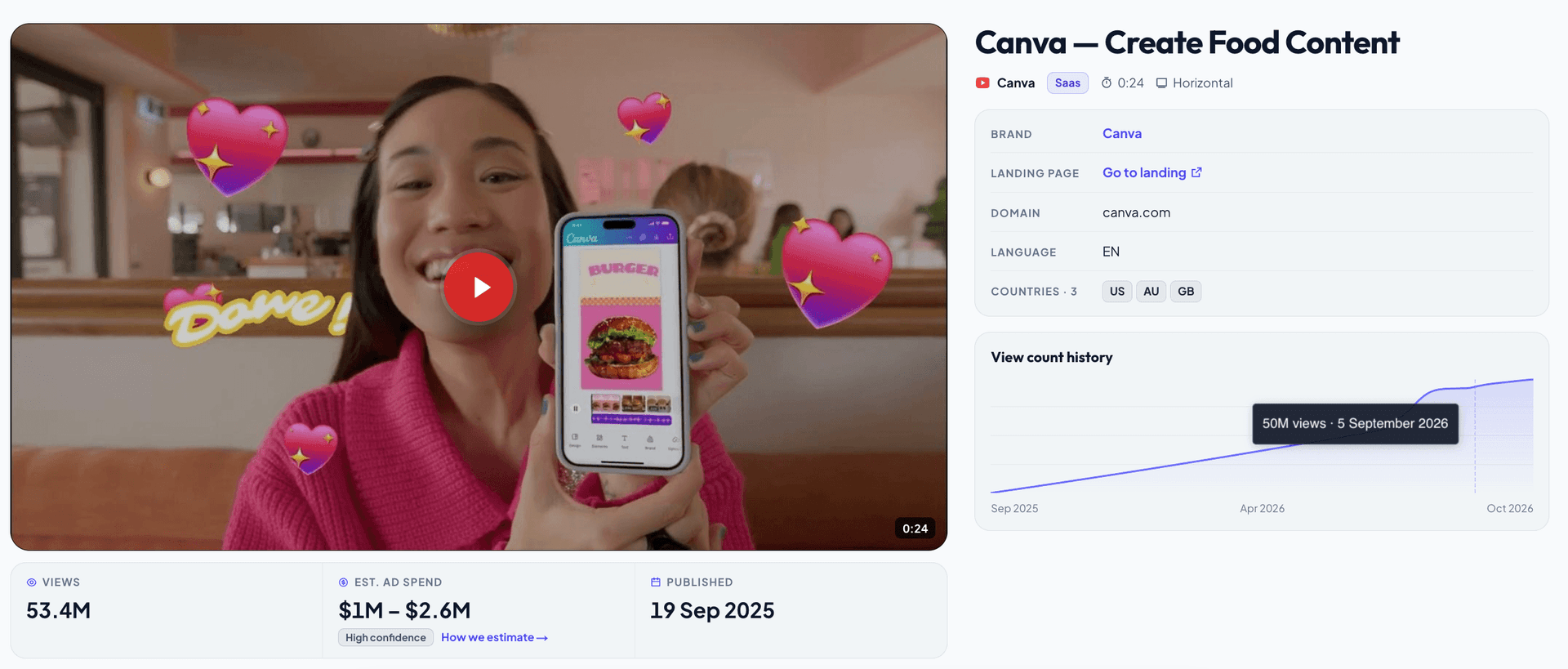
The food ad shows the idea best. A burger arrives with a small Canva flag in it. A woman opens a paper bag and finds a ring light and a mini microphone, films herself eating, and edits the clip in Canva on her phone. The ad has 53.5M views and was published on September 19, 2025.
Canva's top ads treat video the way older ads treated presentations: as the job a small business already has to do every week. The pitch is that the same tool can handle it.
Short ads, many jobs
Canva's YouTube ads are short and each one shows a single job, per AdSee AI: 11 of the top 20 run 15 seconds or less, and none runs longer than 30 seconds. The median top-20 ad runs about 15 seconds.
The jobs are concrete: print a flyer, fix a typo on a poster, edit a cooking video, remove the background from a clip, add captions, build a presentation, finish a document faster. Each ad names one of them in its title and shows it in the editor, usually within the first few seconds.
This keeps every ad easy to understand without sound, which matters on YouTube, where many viewers skip or watch muted. It also lets Canva test features against each other: if the background remover gets more views at the same budget than the caption generator, the next round of ads follows the winner.
What the likes say
Likes on Canva's top YouTube ads stay low, per AdSee AI: 11 on the #1 print ad, 12 on the Canva Pro offer, 37 on Magic Layers, 61 on the food video. The exception is the 6-second brand spot, with 551.
Low likes are normal for skippable in-stream ads, which most viewers see before another video. They are not a sign that an ad failed. But the gap is useful: the one ad with no feature and no offer is the one people chose to like. Brand work and performance work do different jobs, and Canva keeps both in its top 20.
What Canva's UTM codes reveal
Canva's landing URLs name the goal of each ad in plain words, per AdSee AI's landing data: "acq" for acquisition, "rev" for revenue and "bra" for brand. The words sit in the utm_campaign field, next to the market, language and campaign type.
| Ad | Campaign code fragment | Reads as |
|---|---|---|
| Canva Print, #1 | us_en_all_print_generic_mid_acq_print-order_demand-gen | US, English, print, acquisition, Demand Gen |
| Canva Pro offer | au_en_all_payback_generic_lower_rev_demand-gen | Australia, English, payback, revenue, Demand Gen |
| Magic Layers | au_en_all_mau_generic_mid_acq_video-views | Australia, English, monthly active users, acquisition, views |
| Brand spot | us_en_all_free_bra_ins_2026brand-lyw | US, English, free users, brand, 2026 brand campaign |
The codes also show the funnel stage: "mid" and "lower". Read these as Canva's own labels: the meaning is inferred from the words, not confirmed by the company.
How Canva's ads follow Google's ABCD framework
Canva's top YouTube ads follow Google's ABCD framework for YouTube ads, short for Attract, Brand, Connect and Direct, per AdSee AI's review of the top 20. The Brand step comes from the product on screen more than from the logo.
- Attract. A question on a gradient, a search bar, a burger with a flag, a squirrel poster.
- Brand. The Canva editor itself, shown in almost every ad, and a Canva-branded box in the print ad.
- Connect. Everyday jobs: a flyer, a menu post, a presentation, a typo.
- Direct. Templates, Canva Pro or Canva Print, each with its own landing page.
According to Think with Google, an Ipsos study found "+57% more ad view time on YouTube vs. other digital platforms" under similar testing conditions. Read Think with Google's video experiments. Canva uses that time to show the editor at work, which is the most convincing thing it can show.
Canva vs. Adobe on YouTube
Canva has 272 YouTube ads with 2.2B views in AdSee AI, against 1,208 ads and 4.6B views for Adobe, per AdSee AI's brand rankings. Canva gets about twice as many views per ad: 8.1M on average, against 3.8M for Adobe.
The two companies advertise differently. Adobe sells many products to different professions, so it runs many ads. Canva sells one editor to people who are not designers, so it can repeat a smaller set of ads to a wider audience.
There is also a difference in what each ad assumes about the viewer. Canva's top ads never explain what a design tool is. They start with a job the viewer already has, such as a flyer, a menu post or a library sign, and show it done in the editor within seconds.
For any software brand with a single product and a broad audience, Canva's approach is a useful model: fewer ads, each about one job, each with its own landing page.
How to run this teardown on any brand
This teardown used 3 kinds of AdSee AI data: the brand page with its top-20 links, the ad pages, and the details of 5 individual ads. You can repeat it for any software brand in a YouTube ads library in under an hour.
- Start from AdSee AI's page for the brand and open its top 20 ads.
- Group the ads by product: printing, subscription, AI features, video, brand.
- Read the original titles. Canva's are file names with team, quarter and format.
- Read the landing URLs for goal words like "acq", "rev" and "bra".
- Compare likes across ads. Brand spots often earn more than offer ads.
- Check which features get several ads. That is where the budget is going next.
A YouTube ad tracker that stores landing pages and original titles turns these steps into a short checklist.
Where this analysis stops working
This analysis covers Canva's 20 most-viewed YouTube ads as of November 23, 2026, per AdSee AI, and it has 4 limits worth knowing. Treat each conclusion as a reading of the public ads, not of Canva's internal results.
- Views show where the budget went, not which ad brought sign-ups or print orders. Canva does not publish YouTube results.
- Spend is an estimate modelled from views, not a reported figure.
- The goal words in the UTM codes are Canva's own labels; their meaning is inferred, not confirmed.
- Only 5 ads were checked in detail; the other 15 are described from their AdSee pages.
- Display titles on AdSee are written for readers; the original titles quoted here come from the ads themselves and can differ from what the page shows.
Takeaways from Canva's YouTube ads
Canva's top YouTube ads, per AdSee AI, offer 6 lessons for any brand that studies top YouTube ads before planning its own.
- Sell the paid add-on to free users. The #1 ad sells printing, with 176.2M views.
- Show the AI making a mistake. Magic Layers fixes "Quit Please" and gets 79.1M views.
- Keep one brand spot that sells nothing. Six seconds of posters earned 551 likes.
- Write the goal into the campaign code. "acq", "rev" and "bra" make every ad readable.
- Treat video as the next everyday job. Five video ads hold 240.2M views.
- Give each ad its own landing page. Print, Pro, templates and presentations each get one.
FAQ
What is Canva's most-viewed ad on YouTube?
Canva's most-viewed YouTube ad is "Canva Print — Stress-Free Printing Experience", a 15-second spot published on March 28, 2025, with 176.2M views and an estimated $3.53M–$8.81M in spend, per AdSee AI. It shows a Canva-branded box of printed flyers and posters and links to Canva's custom print templates.
What is the Canva Magic Layers ad?
The Canva Magic Layers ad shows an AI writing "Quit Please" on a library poster and the Canva editor fixing it to "Quiet Please". It has 79.1M views, per AdSee AI, and was published on March 12, 2026. Four Magic Layers ads in Canva's top 20 hold 223.1M views together.
How much does Canva spend on YouTube ads?
AdSee AI estimates Canva's all-time YouTube spend at $4.4M–$109M across 272 ads, modelled from views and typical cost-per-view rates rather than reported by Canva. Its top ad, for Canva Print, carries an estimated $3.53M–$8.81M on its own. Treat the ranges as a way to compare ads, not as exact budgets.
How long are Canva's YouTube ads?
Most Canva YouTube ads are short. Eleven of the top 20 run 15 seconds or less, two run 6 seconds, and the longest run 30 seconds, per AdSee AI. The 6-second brand spot "Make your thing a thing" has 75.4M views and 551 likes, the most of any Canva ad checked.
Where does Canva advertise on YouTube?
Canva's YouTube ads ran in 58 countries, per AdSee AI's Canva page, mostly in English, with some in Portuguese and French. The ads checked ran in the US, Canada, Australia, the UK and Mexico, and their landing codes start with a market, such as "us_en" or "au_en".
What does Canva advertise on YouTube?
Canva's top 20 YouTube ads sell five things, per AdSee AI: Canva Print, the Canva Pro subscription with 30% off, AI features such as Magic Layers, video tools such as background removal and captions, and the brand itself. Printing and the subscription carry the two most-viewed ads, with 269.5M views between them.
How can I track Canva's YouTube ads?
You can track Canva's YouTube ads with any YouTube ad tracker that stores landing pages and original titles. In AdSee AI, open AdSee AI's Canva ads page, read the UTM codes for "acq", "rev" and "bra", and group the ads by product to see which features get several ads.
Where can I see all Canva ads?
You can see Canva's top ads, markets and estimated spend on AdSee AI's Canva page in its YouTube ads library: adsee.ai/ad-examples/youtube/brands/canva. Searching Canva in AdSee AI shows every indexed ad, with filters for country, language, date range and orientation, across all 272 ads.